Today I am giving a talk at Do iOS in Amsterdam called “SwiftUI Is One Graph”. The talk argues that a SwiftUI screen is a single graph of values and the parts that read them. The post behind it measured that against the real framework. Arguments are cheap, though, so I built two apps that let you look at it yourself. One is about SwiftUI, and the other works on any AppKit or UIKit app too. Both are available to download now.
They are betas. Both are signed and notarized by Apple, both update themselves, and both have a list of things they do not do yet, which is further down.
OneGraph: paste a view, change a value, see what ran again
OneGraph opens on a face that smiles. Four switches turn it happy, sad, angry or cool. Press one and the window shows what changed, in four places at once:
The source. The lines that read the value you changed are lit.
The picture. SwiftUI’s own picture of the view, and the layers it is made of, pulled apart in depth so you can turn them.
The graph. The values and the parts that read them. Press a value and the lines from it light up.
The explanation. In words, which parts were recomputed and why, and which were reused unchanged.
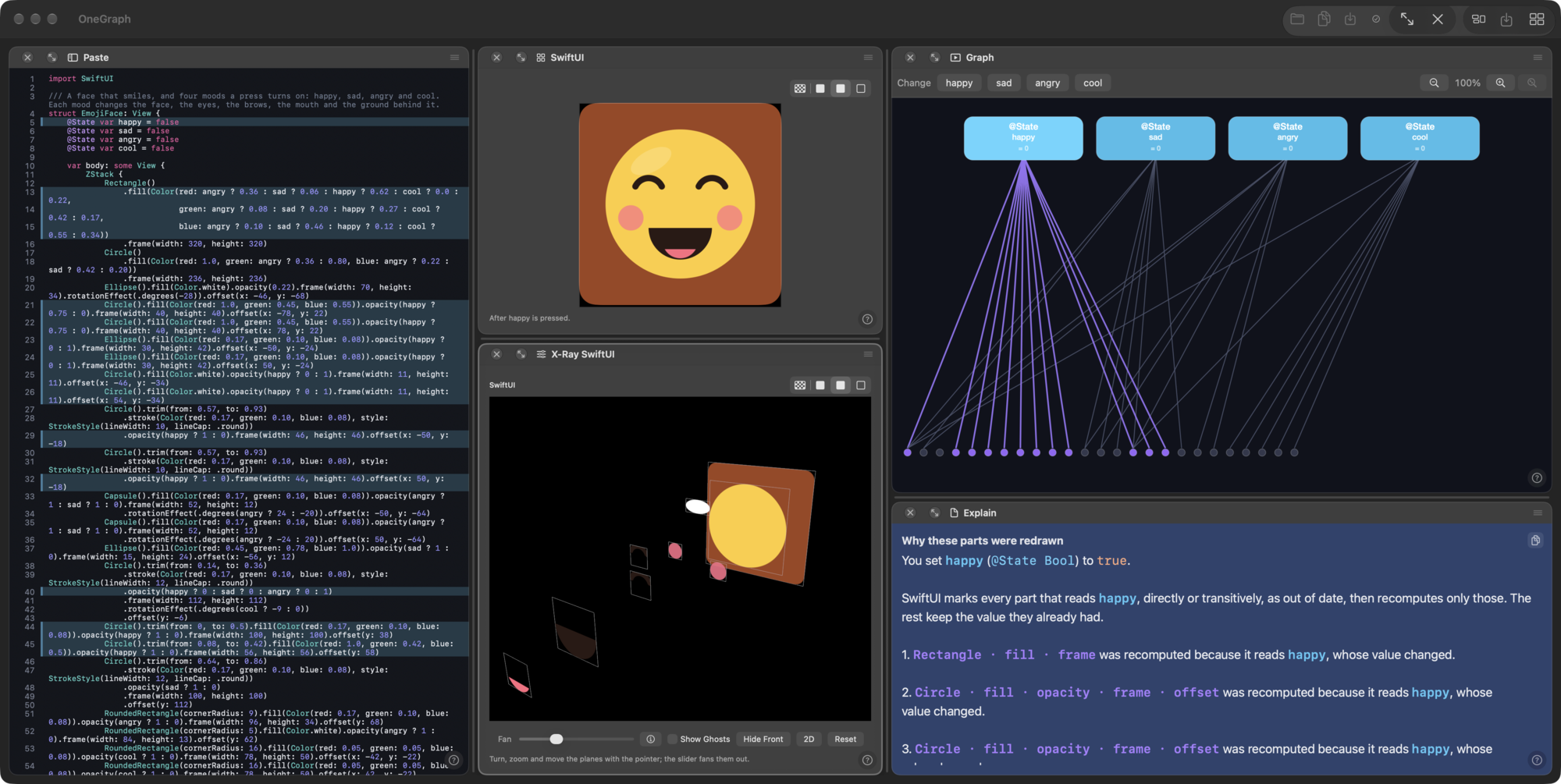
The face is only the first sample. Paste a view of your own and the same four panes work on it. Here is a clock of 134 lines, pasted in, after I pressed second.
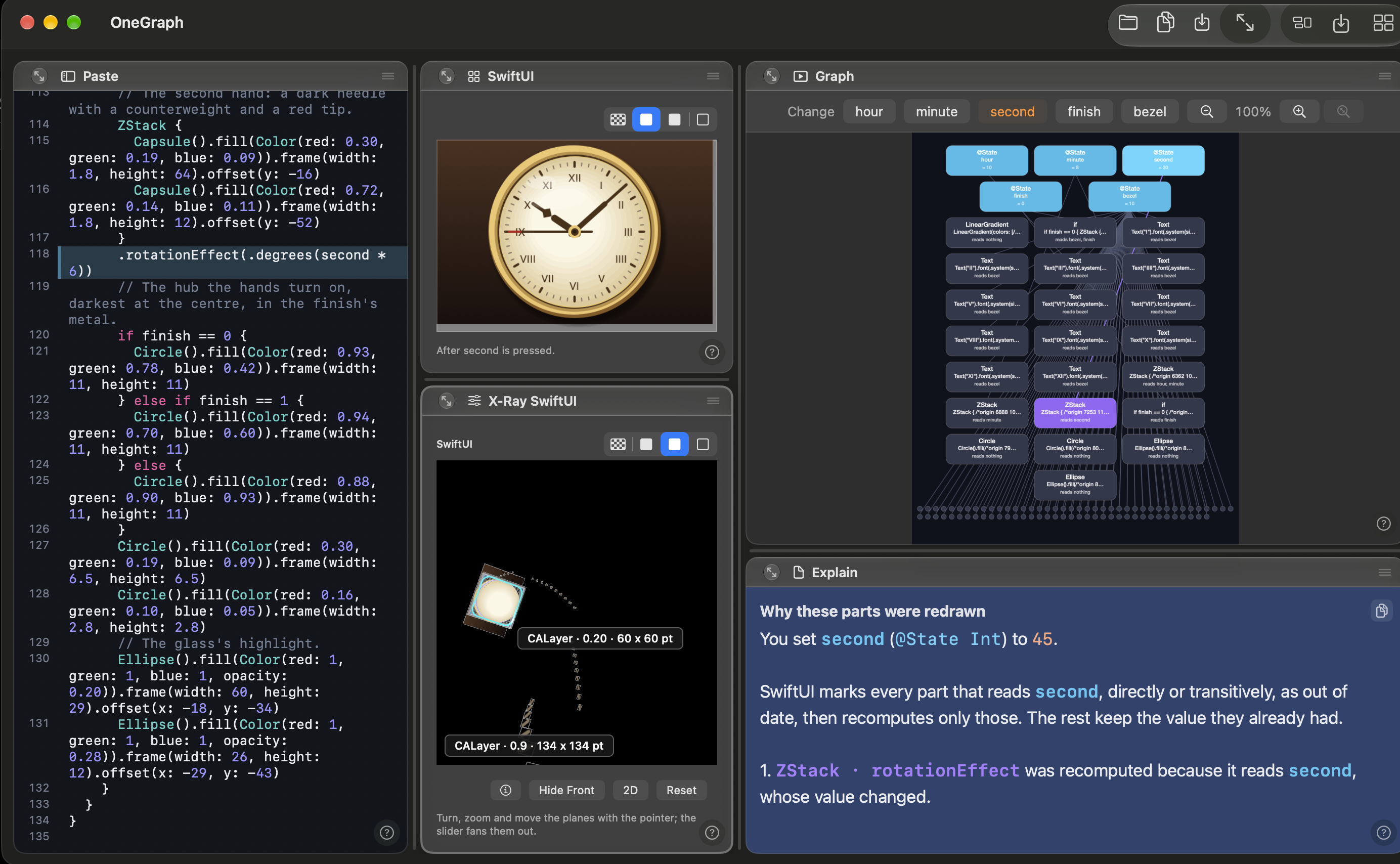
The point is the sentence in the explanation pane: “You set second to 45”, followed by the parts that read it. When a view re-renders more than you expected, this is where you find out which value it was.
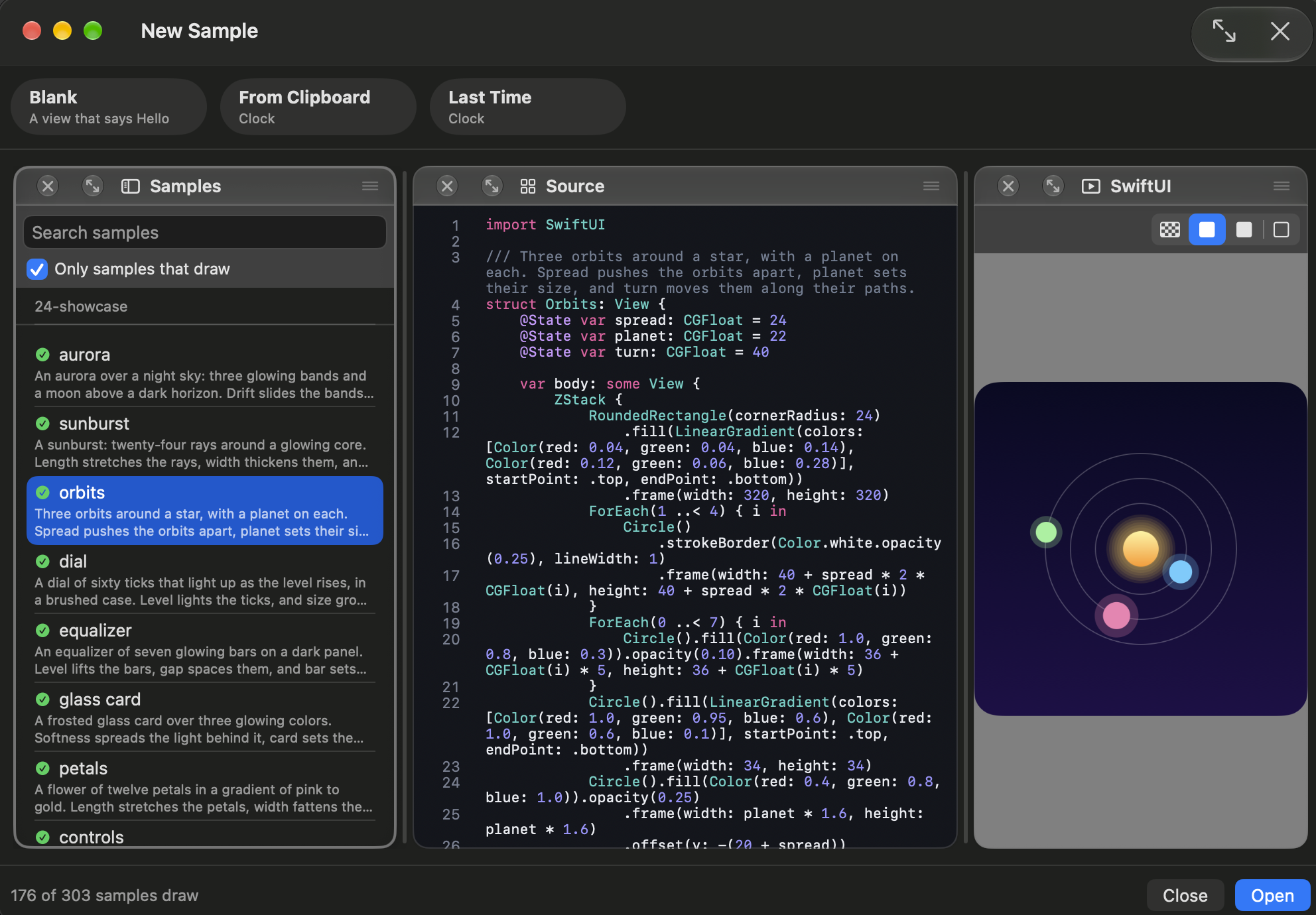
You do not have to write a view first. New Sample lists samples to start from, and a box limits the list to the ones that draw: 176 of 303 when I took this picture. Here is orbits, three orbits around a star, with its source and its picture.
How the picture is made
OneGraph does not compile what you paste. It reads the source with SwiftSyntax and interprets it twice: once into its own graph, which is what the Graph and Explain panes show, and once into real SwiftUI views, which a hidden window draws. The picture you see is SwiftUI’s, not a drawing of mine, and the layers come from that real picture.
I did not want to claim that the two agree, so I measured it. For the face, each switch changes at least 39 percent of the picture, and my interpreter’s picture stays within 0.18 of 255 on average from SwiftUI’s. That check is part of the test run, and it fails if the two drift apart.
XRay Viewer: the layers of a running app
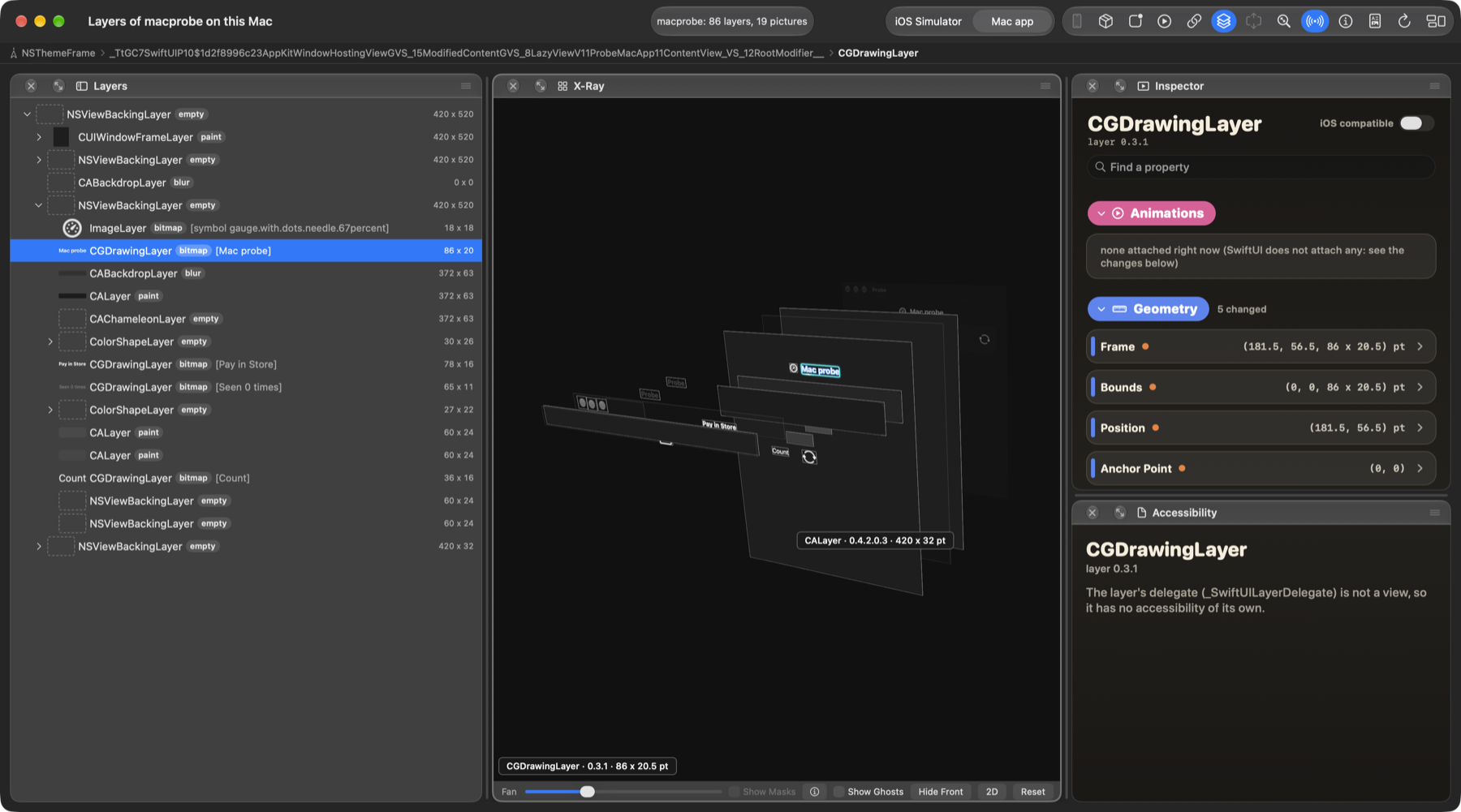
Every screen on Apple’s platforms is drawn as Core Animation layers, whether the app is written in AppKit, UIKit or SwiftUI. XRay Viewer attaches to a Mac app, or an app in the iOS Simulator, and shows you which layers: every layer with its class, size and picture, in a list and in a 3D X-Ray you can turn, zoom and fan out. It does not need the source, and it does not care which framework made the view.
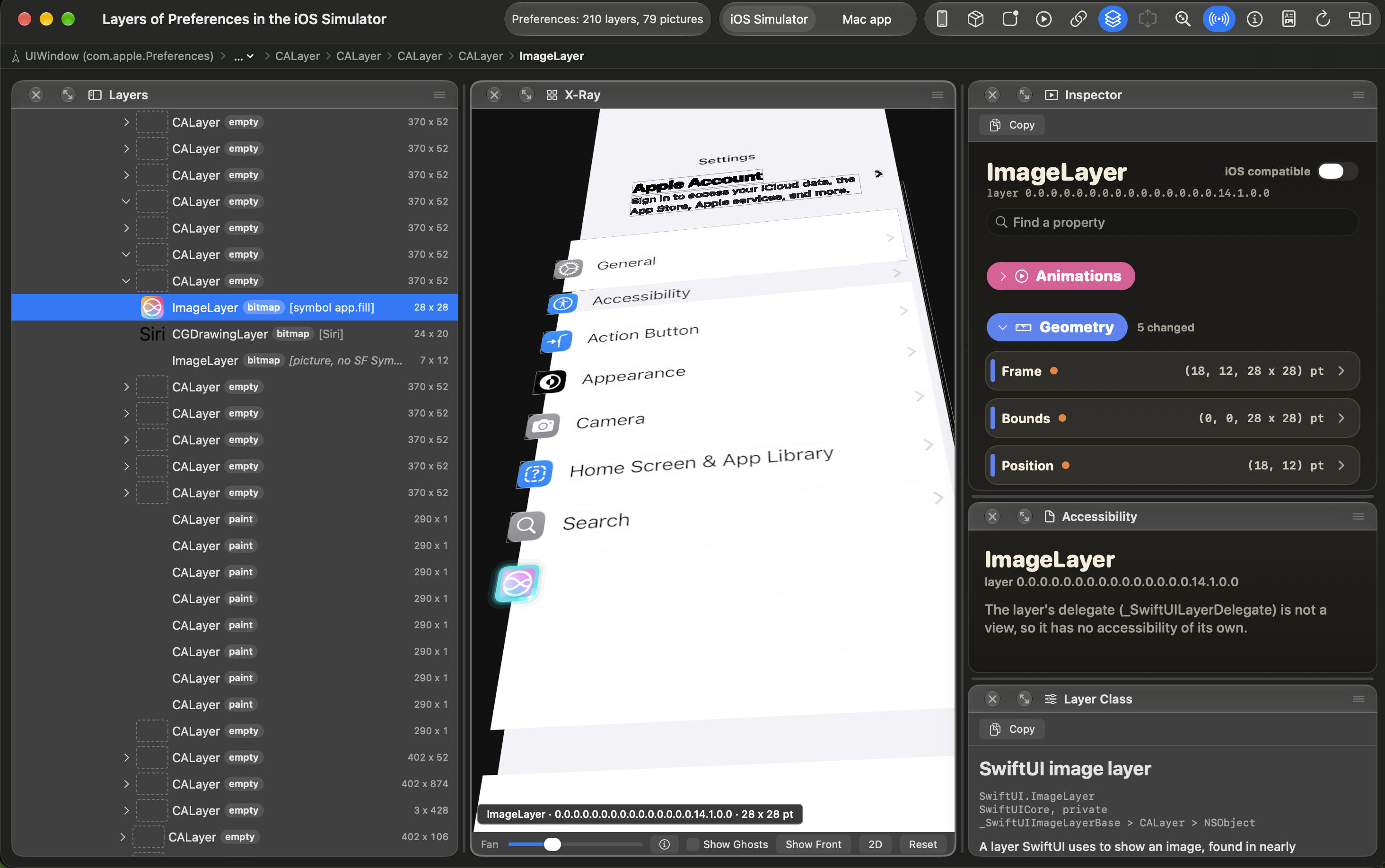
It reads an app in the iOS Simulator the same way. Here it reads Apple’s Settings app: 210 layers and 79 pictures. The layer chosen is an image layer of 28 by 28 points, and the inspector lists its frame, bounds and position, and says it is a SwiftUI image layer.
Pick a layer and the inspector shows every property with its live value, marks the ones the app has changed, and lists the animations running on it. You may change a public property in the running app and put it back with Reset. Private properties are read-only unless you turn on writing, and it asks first, because writing one can crash the app you are inspecting.
How the two fit together
OneGraph starts from SwiftUI source and ends at the layers. XRay Viewer starts from the layers of any app that is already running, SwiftUI or not. If you want to know why a layer exists, read it in XRay Viewer. If you want to know why a value caused it to change, paste the SwiftUI view into OneGraph.
flowchart LR
  s["Your SwiftUI source"] --> g["Graph of values<br/>and parts"]
  g --> p["SwiftUI's picture"]
  p --> l["Core Animation layers"]
  l -.->|"OneGraph shows<br/>this whole path"| s
  r["A running app"] --> l2["Its real layers"]
  l2 -.->|"XRay Viewer<br/>starts here"| r
What they do not do yet
Here is the part I would rather you hear from me.
OneGraph
It reads a little under half of SwiftUI. I measure it on a corpus of 366 real SwiftUI files. On the last full run, 157 of them were read in full, 43 percent, and a later count has 166. The rest stop at a construct the reader does not handle yet, and OneGraph says which one instead of drawing a guess. This counts files, not SwiftUI’s API, so read it as a rough guide.
onAppeardoes not run. The graph shows a variable at the value the source gives it, which can differ from SwiftUI’s picture afteronAppearran. OneGraph says so when a view sets a variable there.A class declared in another file is not seen, because one pasted file cannot show it.
A computed property with several statements is reported as something OneGraph cannot draw yet, and it draws nothing for it instead of guessing.
It is a Mac app. An iPad version is planned, and an iPhone version will be tried after it.
XRay Viewer
It reads a Mac app or an app in the iOS Simulator, not a device, and one app at a time.
It cannot read an app with the App Sandbox.
SwiftUI does not attach an animation to the layer, so the Animations list is empty for a SwiftUI animation. XRay Viewer shows the trace of the values instead, and does not yet say which curve SwiftUI used. Animations written in UIKit, AppKit or Core Animation are listed.
One check is also still open. I have run the first launch only on my own Mac, not on one that never saw the app, so I have not seen the exact words macOS shows the first time you open the download. If it says the app was downloaded from the internet, press Open.
Download
Both need macOS 14 or later. Open the disk image, drag the app to Applications, and update from inside the app with Check for Updates.
If something breaks, or a view you paste draws wrong, write to me. A wrong picture is the most useful report I can get.