
Every SwiftUI developer learns early that modifier order matters. .padding().background(Color.red) is not .background(Color.red).padding(). It is taught as folklore: try both, keep the one that looks right.
For the transform modifiers, offset, rotationEffect, and scaleEffect, it is not folklore. It is matrix order, the same law that governs a CGContext, read from the other end of the chain. And there is one rounding rule hiding inside offset that the algebra does not predict, which I found because a measurement refused to agree with my own prediction.
Here is the smallest version. The same marker, the same two modifiers, written in two orders:
// Orange, on the left.
Rectangle().fill(.orange).frame(width: 120, height: 60)
    .offset(x: 160)
    .rotationEffect(.degrees(30))

// Teal, on the right.
Rectangle().fill(.teal).frame(width: 120, height: 60)
    .rotationEffect(.degrees(30))
    .offset(x: 160)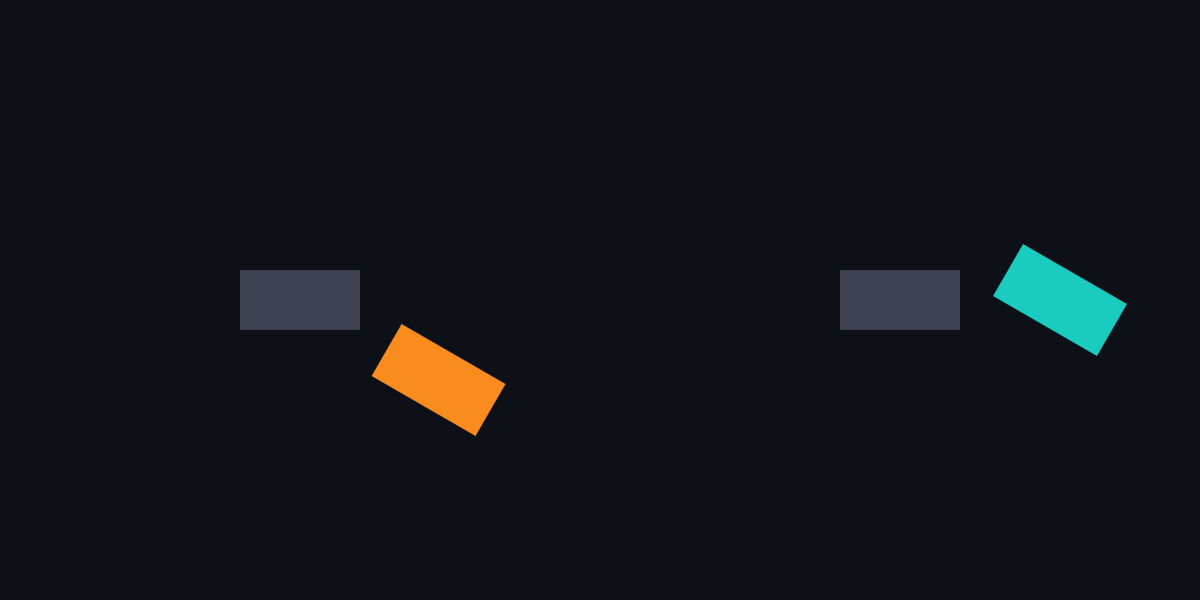
Rendered by SwiftUI’s ImageRenderer. (.orange and .teal are shorthand here; the exact RGB values are in the program at the end.) The grey rectangle on each side is where the marker would sit with no modifiers. Orange, offset then rotated, swings around the view’s centre. Teal, rotated then offset, spins in place and slides straight right.
Let me say the finding precisely, because the imprecise version is wrong. Do not say “SwiftUI applies modifiers bottom to top.” Say:
In a chain of SwiftUI’s transform effects, the one written first, the one closest to the view, is applied to the content first. That is the same rule as Core Graphics, where the transform written last, the one closest to the drawing, is applied to the points first.
Both are one sentence: the operation closest to the content happens first. Core Graphics reads it bottom to top. SwiftUI reads it top to bottom.
This post is the SwiftUI half of a pair. The Core Graphics half, with the full derivation of the matrix, is Issue 2 of Apple UI Insider. Here I check the SwiftUI side by rendering real views and measuring them, and I report the one place where the clean algebra needs a correction.
What the Documentation Promises
Apple’s documentation says the pieces that make this work. It is worth reading them as a set, because together they are the model:
offset(x:y:): “Offset this view by the specified horizontal and vertical distances.” And: “The original dimensions of the view aren’t changed by offsetting the contents.”rotationEffect(_:anchor:): “Rotates a view’s rendered output in two dimensions around the specified point.” It “has no effect on the view’s frame.” The anchor is “a unit point within the view about which to perform the rotation.”scaleEffect(_:anchor:): “Scales this view’s rendered output by the given amount … relative to an anchor point.”position(_:): “Positions the center of this view at the specified point in its parent’s coordinate space.”
Three consequences follow. These modifiers act on rendered output, not on layout, so they never make room for themselves. Each rotates or scales about an anchor inside the view’s frame, and the frame is the layout frame at that point in the chain, which is why frame changes where an anchor is. And the Core Graphics side is documented as CGContext.concatenate(_:), “Transforms the user coordinate system in a context using a specified matrix”, with translateBy, rotate, and scaleBy as shorthand for the common matrices.
So the model is a matrix per modifier, each about its own anchor, composed in some order. The only open question is the order. Test it.
The Witness
The test has no SwiftUI knowledge in the prediction. Each experiment renders one 120 by 60 marker with ImageRenderer, finds where its pixels landed, and compares that with a closed-form prediction built from CGAffineTransform:
Write each modifier as a matrix about the marker’s own centre: a shift, a rotation by 30 degrees, a stretch, or a rotation about a corner anchor.
Compose them with the first-written modifier applied first.
Predict where the marker’s centre goes, how much area it covers, and its second moments, which are what tell a rotation from a shear.
Measure the same three things in the rendered pixels. Each pixel’s coverage is how far its colour lies along the line from the background to the marker colour, so anti-aliased edges count fractionally.
Eight chains, in four pairs. The second member of each pair is the same two modifiers swapped, and that matters twice: it is the experiment, and it is the control. If the measurement could not tell a chain from its swapped partner, it would prove nothing, so the last column is how far the partner’s prediction misses the measured result.
| Chain, in the order written | Centre lands at | Centre error | Shape error | The swapped partner misses by |
|---|---|---|---|---|
.offset(x: 160) then .rotationEffect(30°) | (538.6, 305.0) | 0.001 px | 0.0318% | 82.8 px |
.rotationEffect(30°) then .offset(x: 160) | (560.0, 225.0) | 0.000 px | 0.0148% | 82.8 px |
.offset(x: 80) then .scaleEffect(2) | (560.0, 225.0) | 0.000 px | 0.0000% | 80.0 px |
.scaleEffect(2) then .offset(x: 80) | (480.0, 225.0) | 0.000 px | 0.0000% | 80.0 px |
.scaleEffect(x: 2) then .rotationEffect(30°) | (400.0, 225.0) | 0.000 px | 0.0050% | shape off by 31.8% |
.rotationEffect(30°) then .scaleEffect(x: 2) | (400.0, 225.0) | 0.000 px | 0.0043% | shape off by 30.0% |
.rotationEffect(30°, anchor: .topLeading) then .frame(300 × 200) | (377.0, 251.0) | 0.001 px | 0.0198% | 59.0 px |
.frame(300 × 200) then .rotationEffect(30°, anchor: .topLeading) | (329.9, 286.6) | 0.001 px | 0.0307% | 59.0 px |
Measured on macOS 27.0.1 (Build 26A434), ImageRenderer at scale 1, 8-bit sRGB. Shape error is the largest second-moment difference as a percentage of the larger predicted variance.
The worst centre error across all eight is 0.0009 pixels. The worst shape error is 0.03%. The swapped partner misses by 59 to 83 pixels, or by 30 to 32 percent of the shape. The measurement can tell the two orders apart by a margin of three to five orders of magnitude, and in each case the first-written-first prediction wins. Each pair deserves its own picture.
The Offset Gets Scaled
.offset(x: 80).scaleEffect(2) lands at x = 560. .scaleEffect(2).offset(x: 80) lands at x = 480. The scale after the offset multiplies the offset: 80 points of shift becomes 160. The scale before it leaves the offset alone, because by the time the offset runs, the marker is already big and the shift is in parent points.
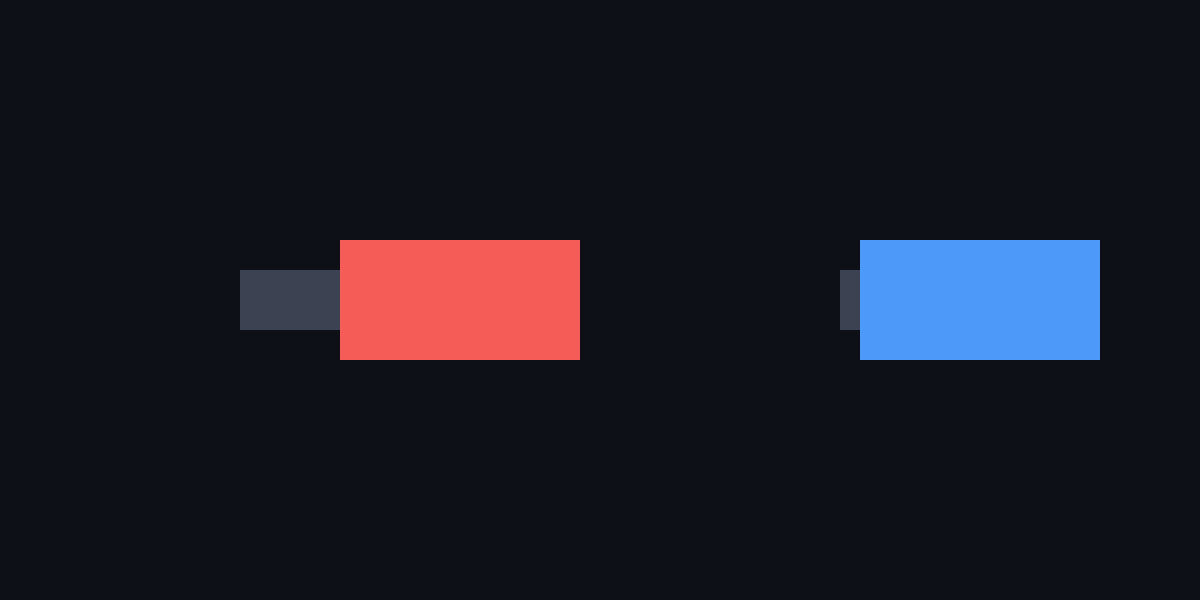
Coral: .offset(x: 80).scaleEffect(2). Blue: .scaleEffect(2).offset(x: 80). Grey: the unmodified marker.
Here it is moving. The offset sweeps from 0 to 80 points and back, in whole points, for a reason the last section explains. The coral marker travels twice as far as the blue one for the same number.

Every frame of this animation, all 72, was measured against the algebra: worst centre error 0.0000 pixels. Full-quality video: MP4.
Rotate Then Stretch Is a Shear
Stretch a rectangle to twice its width with .scaleEffect(x: 2, y: 1) and rotate it 30 degrees. Written scale then rotate, the stretch happens first along the rectangle’s own width, and the rectangle then turns: it stays a rectangle. Written rotate then scale, the rotation happens first and the stretch second, along the page’s x axis: the rectangle shears into a parallelogram.
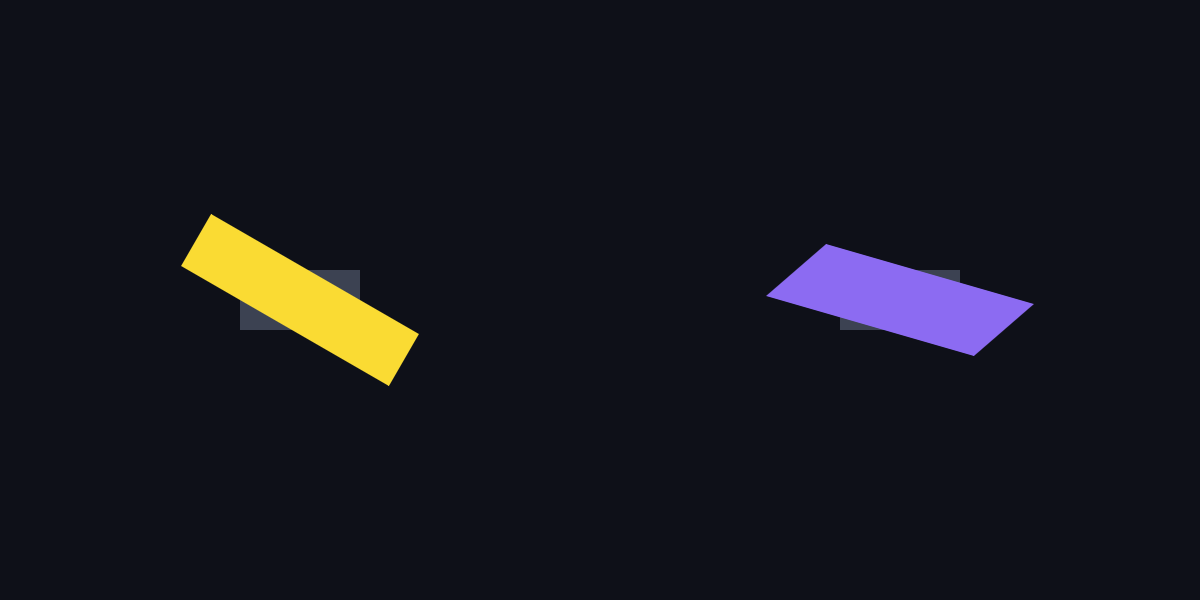
Yellow: .scaleEffect(x: 2).rotationEffect(.degrees(30)). Violet: .rotationEffect(.degrees(30)).scaleEffect(x: 2). The centre is the same in both, which is why the table’s control for this pair is the shape, not the position.
Both orders cover the same area and sit at the same centre. Only the second moments tell them apart, and they differ by 30 percent. This is the identical result to the Core Graphics case in the newsletter, with the written order mirrored.
The Anchor Lives in the Frame at That Point in the Chain
rotationEffect(_:anchor:) rotates about a unit point of the view. But which view? The one you have built so far. Put a frame(width: 300, height: 200) before the rotation and the anchor .topLeading is the top-left corner of the 300 by 200 frame. Put it after, and it is the top-left corner of the marker.
// Pivots on the marker's own top-left corner.
marker.rotationEffect(.degrees(30), anchor: .topLeading).frame(width: 300, height: 200)

// Pivots on the frame's top-left corner, 90 points left and 70 points up of the marker's own.
marker.frame(width: 300, height: 200).rotationEffect(.degrees(30), anchor: .topLeading)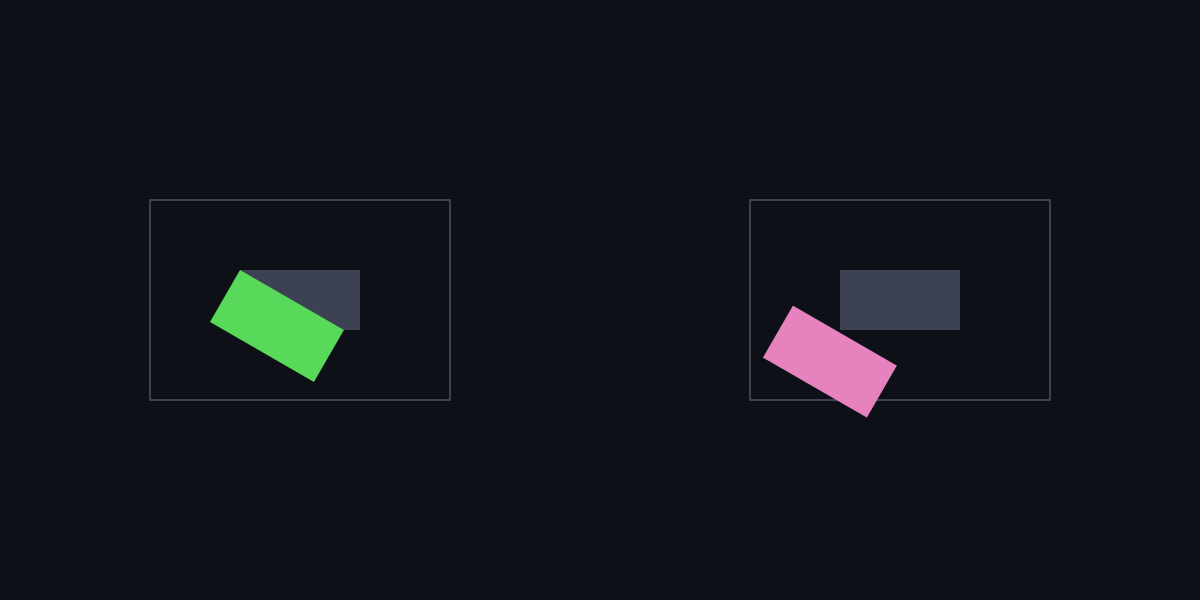
Green pivots on the marker’s own corner and lands at (377.0, 251.0). Pink pivots on the frame’s corner and lands at (329.9, 286.6). The outlines are the 300 by 200 frame. The grey rectangle is the unrotated marker.
The documentation said this in two separate places: rotationEffect does not change the frame, and the anchor is within the view. Together they mean the order of frame and rotationEffect moves the pivot. The measurement puts a number on it: 59.0 pixels.
Same Words, Opposite Behaviour
Here is the part that catches people who already know Core Graphics. Take the rotation sweep from the newsletter, where translate then rotate spins the arm in place. The SwiftUI version, with the same words in the same order, does the opposite:
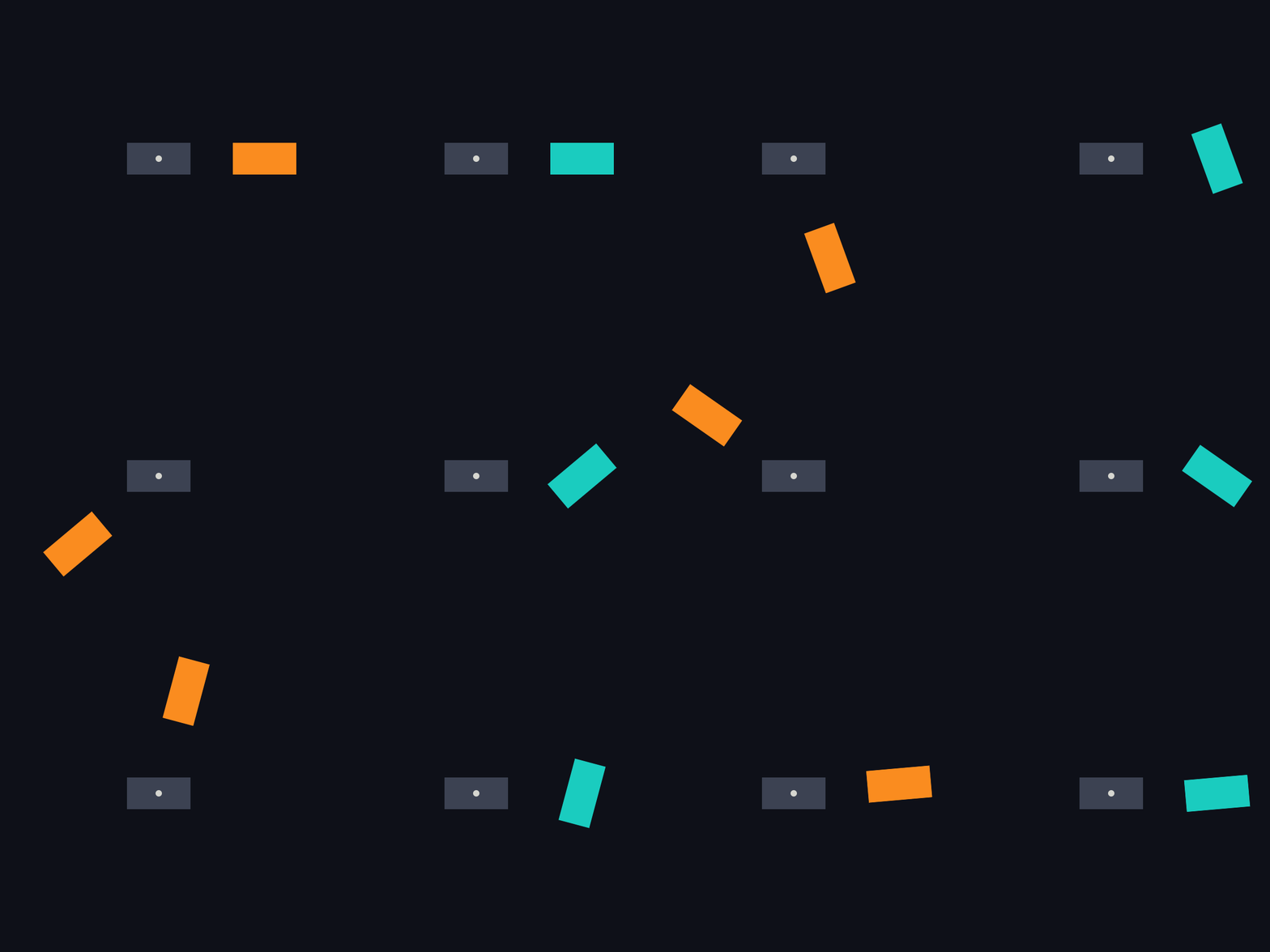
Orange: .offset(x: 200).rotationEffect(angle), which orbits the pale dot. Teal: .rotationEffect(angle).offset(x: 200), which spins in place while sitting 200 points to the right. All 72 frames measured: worst centre error 0.0102 pixels. Full-quality video: MP4.
In Core Graphics, “translate, rotate” means rotate-then-translate on the points, which spins in place. In SwiftUI, “offset, rotate” means offset-then-rotate on the content, which orbits. The words are the same. The rule, closest to the content first, is the same. The reading direction is mirrored, so the behaviour is too.
SwiftUI and Core Graphics Draw the Same Pixels
The witness also draws each prediction with Core Graphics, as one concatenate of the same matrix, and compares it with what SwiftUI rendered.
Of 360,000 pixels per image, SwiftUI and Core Graphics differ in 440 to 737 on the rotated chains, all on anti-aliased edges, with a mean difference between 0.0006% and 0.0017% of full scale. On the two chains that are only an offset and an integer scale, the two renderings are identical, 0 pixels, byte for byte.
That is a second, independent confirmation. The prediction was built from CGAffineTransform and drawn by Core Graphics. SwiftUI never saw it. They agree to the pixel.
.offset Snaps to the Pixel Grid
Now the correction.
My first animation of the offset-and-scale pair did not agree with the algebra. Not by much: the worst frame was off by 0.97 pixels, in a scene where everything else was within 0.01. I assumed my measurement was leaking a neighbouring shape into the tally, because that is what had gone wrong earlier in the same project. I fixed that and the 0.97 stayed. So I stopped assuming and asked directly: where does SwiftUI put a view offset by a fractional amount?
| Requested | At render scale 1 | At scale 2 | At scale 3 |
|---|---|---|---|
| -10.50 | -10.000 | -10.500 | -10.333 |
| -0.60 | -1.000 | -0.500 | -0.667 |
| -0.50 | 0.000 | -0.500 | -0.333 |
| -0.40 | 0.000 | -0.500 | -0.333 |
| 0.20 | 0.000 | 0.000 | 0.333 |
| 0.25 | 0.000 | 0.500 | 0.333 |
| 0.50 | 1.000 | 0.500 | 0.667 |
| 0.75 | 1.000 | 1.000 | 0.667 |
| 10.30 | 10.000 | 10.500 | 10.333 |
| 10.50 | 11.000 | 10.500 | 10.667 |
Measured: how far .offset(x:) actually moved a marker, in points. Rows are a subset of the full run printed by the program at the end of this post.
.offset rounds its amount to the device pixel grid: whole points at scale 1, halves at scale 2, thirds at scale 3, with exact ties rounding up. And it does that before any modifier written after it sees the result.
Which is the correction the algebra needs. A scale after the offset multiplies the rounding, not just the offset:
| Requested | .offset, .scaleEffect(2) lands | Algebra says | .scaleEffect(2), .offset lands | Algebra says |
|---|---|---|---|---|
| 0.25 | 0.000 | 0.50 | 0.000 | 0.25 |
| 0.50 | 2.000 | 1.00 | 1.000 | 0.50 |
| 0.75 | 2.000 | 1.50 | 1.000 | 0.75 |
| 10.30 | 20.000 | 20.60 | 10.000 | 10.30 |
| 10.50 | 22.000 | 21.00 | 11.000 | 10.50 |
| 79.60 | 160.000 | 159.20 | 80.000 | 79.60 |
Measured at render scale 1, in points. Ask for half a point before a scale of 2 and you get two. The algebra said one.
Rotation did not show this. The first chain in the table above lands at (538.6, 305.0), a fractional position, within 0.001 pixels of the unrounded prediction, so the result of a rotation is not snapped to the grid. The rounding belongs to offset. I only tested rotation by 30 degrees and scale by 2, including by 2 along one axis, so I will not claim more than that.
Proof Status
Following the discipline from The SwiftUI Oracle, the claim is split into labeled evidence, because “it looks right” is not a result:
| Claim | Status | Evidence |
|---|---|---|
| Transform modifiers act on rendered output and do not change the view’s frame. | documented | offset(x:y:): “The original dimensions of the view aren’t changed”. rotationEffect(_:anchor:): “no effect on the view’s frame”. |
| An anchor is a point within the view at that position in the chain. | documented, witnessed | rotationEffect documents the anchor as “a unit point within the view”. The frame pair moves the pivot, centre 59.0 px apart. |
| The modifier written first is applied to the content first. | witnessed | Eight chains: worst centre error 0.0009 px, worst shape error 0.0318%. |
| Reading the chain the other way is detectably wrong. | witnessed | The swapped partner of each chain misses by 59.0 to 82.8 px, or 30.0 to 31.8% of the shape. |
| SwiftUI’s render equals Core Graphics drawing the same matrix. | witnessed | 0 to 737 differing pixels of 360,000, mean difference at most 0.0017% of full scale. |
.offset is rounded to the render scale’s pixel grid, ties up, before later modifiers. | witnessed | Offset alone at render scales 1, 2, and 3, and offset before .scaleEffect(2). Not mentioned in the documentation pages I read. |
| The same rounding happens in a live window on screen. | not measured | Everything here is ImageRenderer output. I did not capture on-screen frames, so I make no claim about them. |
| The same order law holds for other modifiers. | not measured | padding, scaledToFit, GeometryEffect, and the 3D effects were not tested. |
Every measured number in this post comes from macOS 27.0.1 (Build 26A434) with Swift 6.4, ImageRenderer at scale 1 unless noted, rendering into 8-bit sRGB. The Core Graphics twin is drawn into a bitmap flipped so y points down, as it does in SwiftUI.
What To Do With This
Four rules fall out of the measurements, and none is folklore:
Read a chain from the view outward. The first modifier happens first.
Want an offset in the parent’s points, whatever you scale? Put
.offsetafter the scale.Want it multiplied by the scale on purpose? Put it before. And give it numbers the pixel grid can hold, or expect it to be rounded and then multiplied.
Where a pivot matters, a
framebefore the rotation changes it. Decide which rectangle you mean.
Run It Yourself
Two standalone programs, no packages and no project. Both render with ImageRenderer, measure the pixels, and print the tables above. Save each as its own file and run, for example, xcrun swiftc -O witness.swift -o witness && ./witness.
The order witness, 187 lines, prints the eight-chain table:
import AppKit
import SwiftUI

// Witness: does a SwiftUI modifier chain compose in the order the algebra says?
// Each experiment renders one 120 x 60 marker with real SwiftUI (ImageRenderer),
// finds where its pixels landed, and compares that with a closed-form prediction
// made from CGAffineTransform. Nothing here reads the SwiftUI result to build the
// prediction.

struct RGB { let r: Int, g: Int, b: Int }
let background = RGB(r: 14, g: 16, b: 24)
let canvas = CGSize(width: 800, height: 450)
let center = CGPoint(x: 400, y: 225)
let markerSize = CGSize(width: 120, height: 60)

func color(_ c: RGB) -> Color { Color(red: Double(c.r) / 255, green: Double(c.g) / 255, blue: Double(c.b) / 255) }
func marker(_ c: RGB) -> some View { Rectangle().fill(color(c)).frame(width: markerSize.width, height: markerSize.height) }

// Transforms about the marker's own centre, applied to points first-to-last.
let rotate30 = CGAffineTransform(rotationAngle: .pi / 6)
func shift(_ x: CGFloat, _ y: CGFloat) -> CGAffineTransform { CGAffineTransform(translationX: x, y: y) }
func stretch(_ x: CGFloat, _ y: CGFloat) -> CGAffineTransform { CGAffineTransform(scaleX: x, y: y) }
func about(_ anchor: CGPoint, _ t: CGAffineTransform) -> CGAffineTransform {
    shift(-anchor.x, -anchor.y).concatenating(t).concatenating(shift(anchor.x, anchor.y))
}

struct Experiment {
    let name: String
    let fill: RGB
    let view: (RGB) -> AnyView          // the marker with its modifier chain
    let steps: [CGAffineTransform]      // one per modifier, in the order they are written
    /// Closed form: the modifier written first (closest to the view) applies first.
    var answer: CGAffineTransform { steps.reduce(.identity) { $0.concatenating($1) } }
}

let experiments: [Experiment] = [
    Experiment(name: ".offset(x: 160), .rotationEffect(30)", fill: RGB(r: 250, g: 140, b: 31),
               view: { AnyView(marker($0).offset(x: 160, y: 0).rotationEffect(.degrees(30))) },
               steps: [shift(160, 0), rotate30]),
    Experiment(name: ".rotationEffect(30), .offset(x: 160)", fill: RGB(r: 26, g: 204, b: 191),
               view: { AnyView(marker($0).rotationEffect(.degrees(30)).offset(x: 160, y: 0)) },
               steps: [rotate30, shift(160, 0)]),
    Experiment(name: ".offset(x: 80), .scaleEffect(2)", fill: RGB(r: 245, g: 92, b: 87),
               view: { AnyView(marker($0).offset(x: 80, y: 0).scaleEffect(2)) },
               steps: [shift(80, 0), stretch(2, 2)]),
    Experiment(name: ".scaleEffect(2), .offset(x: 80)", fill: RGB(r: 77, g: 153, b: 250),
               view: { AnyView(marker($0).scaleEffect(2).offset(x: 80, y: 0)) },
               steps: [stretch(2, 2), shift(80, 0)]),
    Experiment(name: ".scaleEffect(x: 2), .rotationEffect(30)", fill: RGB(r: 250, g: 219, b: 51),
               view: { AnyView(marker($0).scaleEffect(x: 2, y: 1).rotationEffect(.degrees(30))) },
               steps: [stretch(2, 1), rotate30]),
    Experiment(name: ".rotationEffect(30), .scaleEffect(x: 2)", fill: RGB(r: 140, g: 107, b: 242),
               view: { AnyView(marker($0).rotationEffect(.degrees(30)).scaleEffect(x: 2, y: 1)) },
               steps: [rotate30, stretch(2, 1)]),
    Experiment(name: ".rotationEffect(30, .topLeading), .frame(300 x 200)", fill: RGB(r: 89, g: 217, b: 89),
               view: { AnyView(marker($0).rotationEffect(.degrees(30), anchor: .topLeading).frame(width: 300, height: 200)) },
               steps: [about(CGPoint(x: -60, y: -30), rotate30)]),
    Experiment(name: ".frame(300 x 200), .rotationEffect(30, .topLeading)", fill: RGB(r: 230, g: 130, b: 190),
               view: { AnyView(marker($0).frame(width: 300, height: 200).rotationEffect(.degrees(30), anchor: .topLeading)) },
               steps: [about(CGPoint(x: -150, y: -100), rotate30)]),
]

// MARK: rendering

@MainActor
func renderSwiftUI(_ experiment: Experiment) -> CGImage? {
    let scene = ZStack(alignment: .topLeading) {
        color(background)
        experiment.view(experiment.fill).position(x: center.x, y: center.y)
    }
    .frame(width: canvas.width, height: canvas.height, alignment: .topLeading)
    let renderer = ImageRenderer(content: scene)
    renderer.scale = 1
    return renderer.cgImage
}

/// The same transform drawn with Core Graphics in a y-down sRGB bitmap.
func renderCoreGraphics(_ experiment: Experiment) -> CGImage? {
    guard let context = CGContext(
        data: nil, width: Int(canvas.width), height: Int(canvas.height), bitsPerComponent: 8, bytesPerRow: 0,
        space: CGColorSpace(name: CGColorSpace.sRGB)!, bitmapInfo: CGImageAlphaInfo.premultipliedLast.rawValue
    ) else { return nil }
    func cg(_ c: RGB) -> CGColor { CGColor(srgbRed: CGFloat(c.r) / 255, green: CGFloat(c.g) / 255, blue: CGFloat(c.b) / 255, alpha: 1) }
    context.translateBy(x: 0, y: canvas.height)
    context.scaleBy(x: 1, y: -1)
    context.setFillColor(cg(background))
    context.fill(CGRect(origin: .zero, size: canvas))
    context.translateBy(x: center.x, y: center.y)
    context.concatenate(experiment.answer)     // one concatenate: the same matrix, no SwiftUI involved
    context.setFillColor(cg(experiment.fill))
    context.fill(CGRect(x: -markerSize.width / 2, y: -markerSize.height / 2, width: markerSize.width, height: markerSize.height))
    return context.makeImage()
}

// MARK: measurement

func pixels(_ image: CGImage) -> [UInt8] {
    var data = [UInt8](repeating: 0, count: image.width * image.height * 4)
    let context = CGContext(
        data: &data, width: image.width, height: image.height, bitsPerComponent: 8, bytesPerRow: image.width * 4,
        space: CGColorSpace(name: CGColorSpace.sRGB)!, bitmapInfo: CGImageAlphaInfo.premultipliedLast.rawValue
    )!
    context.draw(image, in: CGRect(x: 0, y: 0, width: image.width, height: image.height))
    return data
}

struct Measured { var center: CGPoint; var area: Double; var xx: Double; var xy: Double; var yy: Double }

/// Coverage of each pixel = how far its colour lies along the line background -> marker.
/// Pixel (i, j) is the square [i, i+1] x [j, j+1], so its centre is (i + 0.5, j + 0.5).
func measure(_ image: CGImage, fill: RGB) -> Measured? {
    let data = pixels(image)
    let bg = [Double(background.r), Double(background.g), Double(background.b)]
    let axis = [Double(fill.r) - bg[0], Double(fill.g) - bg[1], Double(fill.b) - bg[2]]
    let axisLengthSquared = axis.reduce(0) { $0 + $1 * $1 }
    var samples: [(w: Double, x: Double, y: Double)] = []
    for row in 0 ..< image.height {
        for column in 0 ..< image.width {
            let o = (row * image.width + column) * 4
            let delta = [Double(data[o]) - bg[0], Double(data[o + 1]) - bg[1], Double(data[o + 2]) - bg[2]]
            let w = min(1, max(0, zip(delta, axis).reduce(0) { $0 + $1.0 * $1.1 } / axisLengthSquared))
            let residual = zip(delta, axis).map { $0 - w * $1 }.reduce(0) { $0 + $1 * $1 }.squareRoot()
            if w > 0, residual <= 12 { samples.append((w, Double(column) + 0.5, Double(row) + 0.5)) }
        }
    }
    let total = samples.reduce(0) { $0 + $1.w }
    guard total > 0 else { return nil }
    let cx = samples.reduce(0) { $0 + $1.w * $1.x } / total
    let cy = samples.reduce(0) { $0 + $1.w * $1.y } / total
    let xx = samples.reduce(0) { $0 + $1.w * ($1.x - cx) * ($1.x - cx) } / total + 1.0 / 12
    let xy = samples.reduce(0) { $0 + $1.w * ($1.x - cx) * ($1.y - cy) } / total
    let yy = samples.reduce(0) { $0 + $1.w * ($1.y - cy) * ($1.y - cy) } / total + 1.0 / 12
    return Measured(center: CGPoint(x: cx, y: cy), area: total, xx: xx, xy: xy, yy: yy)
}

/// Closed-form prediction: where the centre goes, how much area, and the second moments.
func predict(_ t: CGAffineTransform) -> Measured {
    let c = CGPoint(x: center.x + t.tx, y: center.y + t.ty)
    let sx = Double(markerSize.width * markerSize.width) / 12, sy = Double(markerSize.height * markerSize.height) / 12
    let a = Double(t.a), b = Double(t.b), cc = Double(t.c), d = Double(t.d)
    return Measured(
        center: c, area: Double(markerSize.width * markerSize.height) * abs(a * d - b * cc),
        xx: a * a * sx + cc * cc * sy, xy: a * b * sx + cc * d * sy, yy: b * b * sx + d * d * sy
    )
}

// MARK: report

@MainActor
func run() {
    print("chain                                                   predicted        measured         err px  shape err  swapped partner would miss by      swiftui vs CG twin")
    var worst = 0.0, worstShape = 0.0
    for (index, experiment) in experiments.enumerated() {
        guard let image = renderSwiftUI(experiment), let m = measure(image, fill: experiment.fill) else {
            print("\(experiment.name): render or measurement failed"); continue
        }
        // The matrix is expressed about the marker's own centre, so the centre ends up (tx, ty) from where it started.
        let p = predict(experiment.answer)
        let error = hypot(m.center.x - p.center.x, m.center.y - p.center.y)
        // Control: the partner is the same two modifiers written in the other order.
        // If the measurement could not tell the two orders apart, it would prove nothing.
        let q = predict(experiments[index ^ 1].answer)
        let centreMiss = hypot(m.center.x - q.center.x, m.center.y - q.center.y)
        let scale = max(p.xx, p.yy)
        func shapeError(_ x: Measured, _ y: Measured) -> Double {
            max(abs(x.xx - y.xx), abs(x.xy - y.xy), abs(x.yy - y.yy)) / scale
        }
        let ownShape = shapeError(m, p), partnerShape = shapeError(m, q)
        let swapped = String(format: "centre %.1f px, shape %.1f%%", centreMiss, 100 * partnerShape)
        worst = max(worst, error)
        worstShape = max(worstShape, ownShape)
        var twin = "n/a"
        if let cgImage = renderCoreGraphics(experiment) {
            let a = pixels(image), b = pixels(cgImage)
            let differing = stride(from: 0, to: a.count, by: 4).filter { a[$0 ..< $0 + 4] != b[$0 ..< $0 + 4] }.count
            let total = zip(a, b).reduce(0) { $0 + abs(Int($1.0) - Int($1.1)) }
            twin = String(format: "%d px differ, mean %.4f%%", differing, 100 * Double(total) / (Double(a.count) * 255))
        }
        print(String(format: "%@ (%.1f, %.1f)  (%.1f, %.1f)  %.3f  %.4f%%    %@  %@",
                     experiment.name.padding(toLength: 54, withPad: " ", startingAt: 0),
                     p.center.x, p.center.y, m.center.x, m.center.y, error, 100 * ownShape,
                     swapped.padding(toLength: 32, withPad: " ", startingAt: 0), twin))
    }
    print(String(format: "worst centre error: %.4f px, worst shape error: %.4f%% of the larger variance", worst, 100 * worstShape))
}

MainActor.assumeIsolated { run() }
The snapping witness, 62 lines, prints both rounding tables:
import AppKit
import SwiftUI

// Witness: where does SwiftUI actually put a view you offset by a fractional amount?
// A 120 x 60 orange marker is laid out with its centre at x = 400, offset, rendered
// with ImageRenderer at a chosen scale, and its centre of coverage is measured.

let background = (r: 14.0, g: 16.0, b: 24.0)
let orange = (r: 250.0, g: 140.0, b: 31.0)

@MainActor
func measuredCentreX<V: View>(_ marker: V, renderScale: CGFloat) -> Double {
    let scene = ZStack(alignment: .topLeading) {
        Color(red: background.r / 255, green: background.g / 255, blue: background.b / 255)
        marker.position(x: 400, y: 225)
    }
    .frame(width: 800, height: 450, alignment: .topLeading)
    let renderer = ImageRenderer(content: scene)
    renderer.scale = renderScale
    let image = renderer.cgImage!
    var data = [UInt8](repeating: 0, count: image.width * image.height * 4)
    let context = CGContext(
        data: &data, width: image.width, height: image.height, bitsPerComponent: 8, bytesPerRow: image.width * 4,
        space: CGColorSpace(name: CGColorSpace.sRGB)!, bitmapInfo: CGImageAlphaInfo.premultipliedLast.rawValue
    )!
    context.draw(image, in: CGRect(x: 0, y: 0, width: image.width, height: image.height))
    let axis = (orange.r - background.r, orange.g - background.g, orange.b - background.b)
    let axisLengthSquared = axis.0 * axis.0 + axis.1 * axis.1 + axis.2 * axis.2
    var total = 0.0, moment = 0.0
    for row in 0 ..< image.height {
        for column in 0 ..< image.width {
            let o = (row * image.width + column) * 4
            let d = (Double(data[o]) - background.r, Double(data[o + 1]) - background.g, Double(data[o + 2]) - background.b)
            let w = min(1, max(0, (d.0 * axis.0 + d.1 * axis.1 + d.2 * axis.2) / axisLengthSquared))
            total += w
            moment += w * (Double(column) + 0.5)
        }
    }
    return moment / total / Double(renderScale)    // back to points
}

@MainActor
func run() {
    func marker() -> some View { Rectangle().fill(Color(red: orange.r / 255, green: orange.g / 255, blue: orange.b / 255)).frame(width: 120, height: 60) }

    print(".offset(x:) alone, centre moved by (points):")
    print("requested   scale 1   scale 2   scale 3")
    for t in [-10.5, -0.6, -0.5, -0.4, 0.2, 0.25, 0.3, 0.5, 0.74, 0.75, 10.3, 10.5] {
        let row = [1, 2, 3].map { measuredCentreX(marker().offset(x: t, y: 0), renderScale: CGFloat($0)) - 400 }
        print(String(format: "%8.2f  %8.3f  %8.3f  %8.3f", t, row[0], row[1], row[2]))
    }

    print("\nThen a scale of 2 after it, at render scale 1 (centre moved by, points):")
    print("requested   .offset, .scaleEffect(2)   algebra says   .scaleEffect(2), .offset   algebra says")
    for t in [0.0, 0.25, 0.5, 0.75, 10.3, 10.5, 79.6] {
        let first = measuredCentreX(marker().offset(x: t, y: 0).scaleEffect(2), renderScale: 1) - 400
        let second = measuredCentreX(marker().scaleEffect(2).offset(x: t, y: 0), renderScale: 1) - 400
        print(String(format: "%8.2f  %24.3f  %13.2f  %24.3f  %13.2f", t, first, 2 * t, second, t))
    }
}

MainActor.assumeIsolated { run() }
The full output of the snapping program on the machine that produced this post has more rows than the tables above, and every row agrees with the rule stated there: the amount is rounded to a multiple of one over the render scale, with ties going up.
The Core Graphics half of this story, drawn twice and measured the same way across six figures and three 72-frame animations, is Apple UI Insider Issue 2. In The SwiftUI Oracle I argued that SwiftUI’s behaviour should be checked against an answer key, not trusted from the way it looks. This is one more instance. The folklore about modifier order turns out to be a matrix product, read from the other end, with one rounding rule that no amount of staring at the picture would have shown me.