SwiftUI looks like it does 3D.
rotation3DEffect takes an axis, an anchor, an anchorZ, and a perspective parameter. projectionEffect takes a full ProjectionTransform, and ProjectionTransform can even be initialized directly from a CATransform3D. A custom GeometryEffect hands you the view’s size and lets you return any projection matrix you can compute. Pose one view with these and it looks convincingly, beautifully three-dimensional.
So build a cube. Six faces, one shared space, rotate the camera. That is the simplest possible 3D scene, and pure SwiftUI on iOS and macOS cannot build it. I tested this thesis rather than assuming it: I wrote the counterexample, rendered it headlessly, and inspected the images, and the rendering corrected two of my own claims along the way.
Let me say the finding precisely, because the imprecise version is wrong. Do not say “SwiftUI has no 3D.” Say:
SwiftUI’s iOS/macOS 3D is per-view projected 2D output composited by painter’s order. It has no shared-space, depth-sorted layer hierarchy.
SwiftUI genuinely has per-view 3D projection: one view, one card, one face rotates in space with real perspective. What it lacks is a shared 3D coordinate space across sibling views and a per-frame depth ordering inside it. And the missing piece has a name: it is exactly what Core Animation’s CATransformLayer exists to provide.
The smallest counterexample, pure SwiftUI, no bridge
Here is a self-contained SwiftUI cube. No UIKit, no AppKit, no Core Animation import. It uses only rotation3DEffect(perspective:), the real iOS/macOS 3D view effect. The faces are declared back-to-front for the rest pose, front face last so it paints on top when the cube faces you. That hand-sorted order is the whole point: SwiftUI never recomputes it as the cube rotates, so it is correct only at rest.
import SwiftUI

struct FlatSwiftUICube: View {
    @State private var yaw = 0.0
    @State private var pitch = 20.0
    private let side: CGFloat = 120

    var body: some View {
        VStack(spacing: 24) {
            ZStack {
                // Back-to-front for the rest pose: front (2) declared LAST so it wins at yaw 0.
                face(.yellow, "4", angle: .degrees(180), axis: (0, 1, 0)) // back
                face(.orange, "5", angle: .degrees(90),  axis: (1, 0, 0)) // top
                face(.purple, "6", angle: .degrees(-90), axis: (1, 0, 0)) // bottom
                face(.red,    "1", angle: .degrees(-90), axis: (0, 1, 0)) // left
                face(.green,  "3", angle: .degrees(90),  axis: (0, 1, 0)) // right
                face(.blue,   "2", angle: .degrees(0),   axis: (0, 1, 0)) // front
            }
            // Rotate the WHOLE assembly. There is no shared 3D space, so this is just one
            // more projection applied on top of the already-projected faces.
            .rotation3DEffect(.degrees(pitch), axis: (1, 0, 0), perspective: 0.5)
            .rotation3DEffect(.degrees(yaw),   axis: (0, 1, 0), perspective: 0.5)
            .frame(width: 260, height: 260)

            Slider(value: $yaw,   in: 0...360)
            Slider(value: $pitch, in: -90...90)
        }
        .padding()
    }

    private func face(_ color: Color, _ label: String,
                      angle: Angle, axis: (x: CGFloat, y: CGFloat, z: CGFloat)) -> some View {
        ZStack {
            RoundedRectangle(cornerRadius: 8).fill(color.opacity(0.55))
            RoundedRectangle(cornerRadius: 8).stroke(color, lineWidth: 2)
            Text(label).font(.title).bold().foregroundStyle(.white)
        }
        .frame(width: side, height: side)
        // anchorZ pivots the rotation half a side behind the face. It is the ONLY way to
        // fake shared-space placement on iOS/macOS, because there is no z-translation in a
        // shared 3D coordinate space (transform3DEffect is visionOS-only).
        .rotation3DEffect(angle, axis: axis, anchorZ: -side / 2, perspective: 0.5)
    }
}
I rendered this with ImageRenderer at pitch = 20 across a yaw sweep and inspected it image by image. The observations, rendered, not asserted:
At
yaw = 0, the rest pose: the blue front face reads on top and the assembly reads as “a cube facing you.” But look closer: it is a splayed frustum, not a closed cube. The sides fan outward, because theanchorZpivot cannot push a face out along its normal in a shared space. The correct static shape is already out of reach. That is itself evidence for the thesis.At
yaw = 120: the blue front face has turned to face away from the viewer, yet it still dominates the center, painted on top, its label mirrored. A real cube at this angle shows mostly side and back faces with the front occluded.At
yaw = 180: the front face points fully away, so a depth-sorted cube shows the yellow back face. Instead the yellow face is completely hidden and the blue front face still fills the center, label reversed. This is the unambiguous failure: no depth sort, the declared-last face always wins.
An earlier draft of this analysis asserted the behavior from reasoning, and the render corrected it twice: my original face order buried the front face so the cube was wrong even at rest, and the “cube” at rest is really a frustum. The thesis survived both corrections and came out stronger, which is exactly why a thesis has to be tested.
The failure also fits in one automatable line: at yaw = 180 the center pixel of the SwiftUI render is blue, the wrong winner. Render the Core Animation cube at the matching pose and the center is the true back face. Same pose, opposite winner: painter’s order versus depth sort.
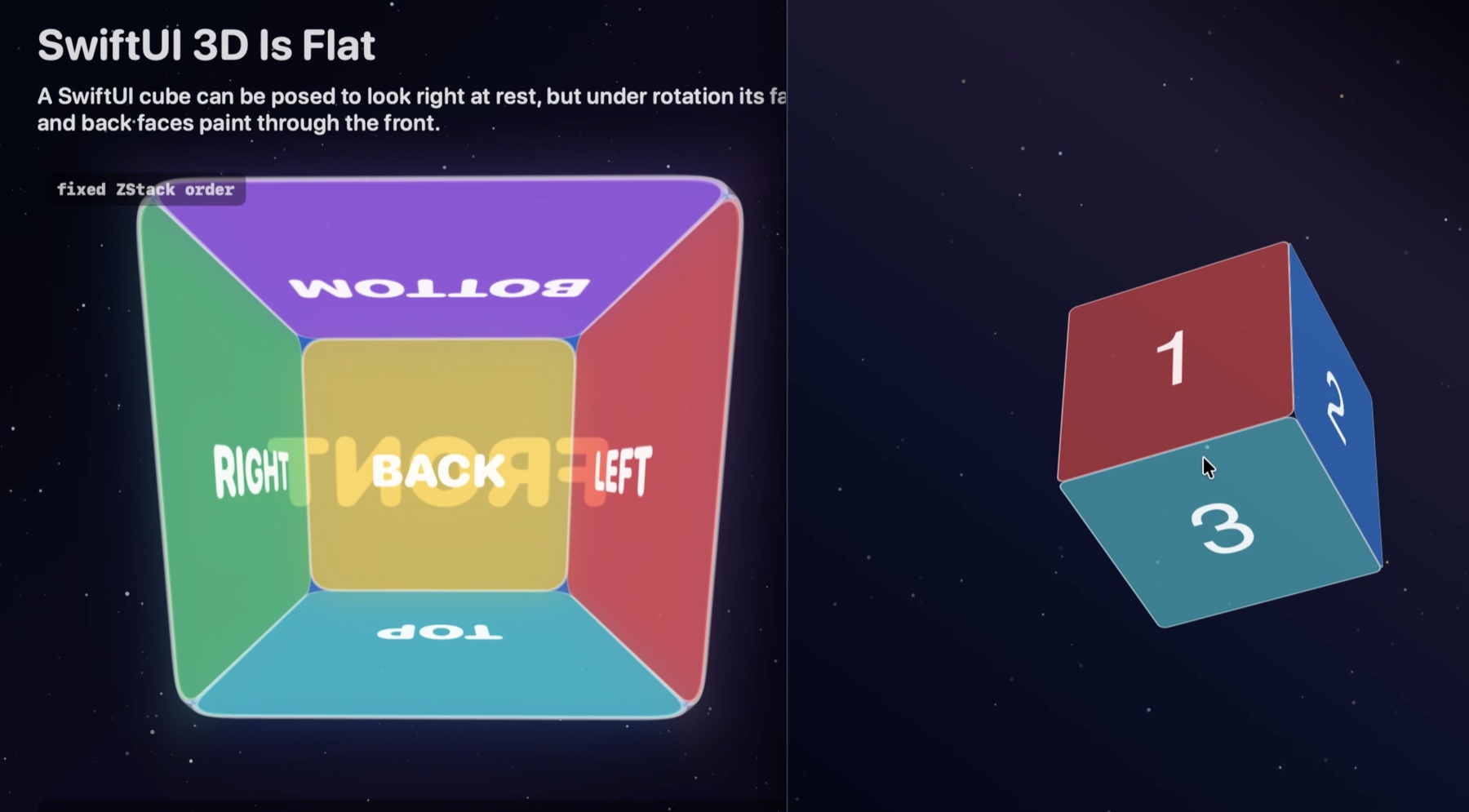
Here is the same failure live, in the pure SwiftUI macOS witness from the AppleCube repository:
What the APIs actually are, in Apple’s words
The decisive evidence is not the demo. It is the documentation, read carefully. Two phrases decide the thesis, and both appear verbatim in Apple’s docs.
Core Animation’s CATransformLayer is documented as the class for “true 3D layer hierarchies, rather than the flattened hierarchy rendering model used by other layer types”, and, unlike normal layers, transform layers “do not flatten their sublayers into the plane at Z=0”.
SwiftUI’s rotation3DEffect on iOS and macOS “renders a view’s content as if it’s rotated” in three dimensions. projectionEffect “applies a projection transformation to this view’s rendered output”.
As-if-rotated rendered output is a 2D projection. It is not membership in a shared 3D scene. The full API picture:
| API | What it does | Availability | Verdict for a shared-space cube |
|---|---|---|---|
CATransformLayer | True 3D layer hierarchies, sublayers not flattened into Z = 0 | iOS 3.0+, macOS 10.6+ | The primitive. Shared 3D space, depth preserved. |
rotation3DEffect(_:axis:anchor:anchorZ:perspective:) | Renders content as if rotated in 3D | iOS 13+, macOS 10.15+ | Per-view projection of rendered output. No shared space. |
projectionEffect(_:) | Applies a projection to rendered output | iOS 13+, macOS 10.15+ | Per-view 2D projection. No shared space. |
transform3DEffect(_:) with AffineTransform3D | A real 3D transform, including z-translation | visionOS only | Not available on iOS/macOS. |
perspectiveRotationEffect(_:axis:) | 3D rotation with perspective | visionOS only | Not available on iOS/macOS. |
rotation3DEffect(_:anchor:) with Rotation3D | Rotation by a true 3D rotation value | visionOS only | Not available on iOS/macOS. |
Read the bottom three rows again. The richer 3D view model exists. Apple built it, named it, shipped it, on visionOS, where the platform has a real depth model. On iOS and macOS those APIs are simply not offered. Nobody forgot 3D. The boundary is deliberate, which is what makes it worth studying.
The SwiftUI filter
So ask the question the way a SwiftUI architect would. Not “which Core Animation properties are missing?”, but:
Given the Core Animation layer model as input, what subset did SwiftUI admit into its value-based view model, under what names, and at what scope?
The answer is a filter, not a one-to-one wrapper. The input side is a persistent object graph: layers with bounds, position, zPosition, anchorPoint, anchorPointZ, a mutable transform, a parent sublayerTransform, a sublayers array, and compositor rules like depth sorting and doubleSided. The output side is SwiftUI’s view value: layout proposes a rectangle, modifiers derive another rendered result from it, the parent composites children in view order plus zIndex.
The filter rule:
SwiftUI admits only the pieces that can be expressed as value transforms of one view’s rendered rectangle. It does not admit API that turns a view subtree into a mutable layer object graph.
Run every relevant Core Animation input through that rule and you get exactly the API that shipped:
| Core Animation input | SwiftUI output | Preserved | Collapsed or rejected | Consequence for the cube |
|---|---|---|---|---|
CALayer.anchorPoint | anchor: UnitPoint | The normalized 2D pivot. | The persistent layer field is gone. The anchor is an argument to one transform or layout operation. | You can pivot one view effect. You cannot rebase an enduring subtree. |
CALayer.anchorPointZ | anchorZ on rotation3DEffect | A Z pivot for one 3D rotation. | Scoped to the modifier, not stored as layer geometry. | anchorZ: -side / 2 can hinge one face. It cannot create shared depth. |
CALayer.transform | rotation3DEffect, projectionEffect, GeometryEffect returning ProjectionTransform | Per-view projection, initializable from CATransform3D. | Retained CATransform3D layer state is collapsed into a projection of rendered output. | One card flip can be correct. Six projected cards are still six siblings. |
CALayer.sublayerTransform | Nothing on iOS/macOS | Nothing at parent-view level. | Rejected: no parent camera matrix over child views. | No single perspective shared by all faces, and no shared vanishing point. |
CATransformLayer | Nothing on iOS/macOS | Nothing. | Rejected: no non-flattening child container. | This is the missing primitive. Without it, a cube is only a pose. |
zPosition | zIndex | A draw-order priority. | Geometric depth collapsed into painter’s order. | The order can be chosen. It is never recomputed from camera depth. |
CALayer.doubleSided | Nothing direct | Nothing direct. | Back-face culling is not exposed as a view-compositor rule. | A two-sided card swaps content manually, per-face simulation, not compositor culling. |
So yes, SwiftUI has anchors. The exact sentence matters: SwiftUI has transform anchors; it does not expose Core Animation’s layer anchor fields. anchor and anchorZ are not CALayer.anchorPoint and anchorPointZ under different names. They are filtered descendants of those ideas. SwiftUI kept the notion of a normalized pivot because it is useful inside a pure value transform, and rejected the durable layer-geometry object that would let a subtree behave like a mutable 3D model.
Why draw the line there? Because the filter is the price of SwiftUI’s core design. Views are values: body produces them, a long-lived dependency graph diffs them, and animatable attributes interpolate copies of their data, off the main thread for the built-in effects. Exposing sublayerTransform, CATransformLayer, or mutable layer geometry would let user code mutate an object graph underneath SwiftUI’s layout, diffing, identity, animation, and cross-platform rendering model. SwiftUI instead keeps the backing renderer private and offers value-level transformations. If I were designing SwiftUI, this is a coherent boundary and I would draw it too. It is also the scientific reason the cube proof fails in pure SwiftUI. Both facts are true at once.
The positive control: the cube that works
Claims need controls. The AppleCube repository keeps four executable targets, a positive and a negative witness on each platform:
| Platform | Positive construction | Negative witness |
|---|---|---|
| iPhone | Cube3DMobile: UIKit host, Core Animation layer scene | SwiftUIFlatMobile: pure SwiftUI flattening failure |
| macOS | Cube3DCAMac: AppKit host, the same layer scene | SwiftUIFlatMac: pure SwiftUI flattening failure |
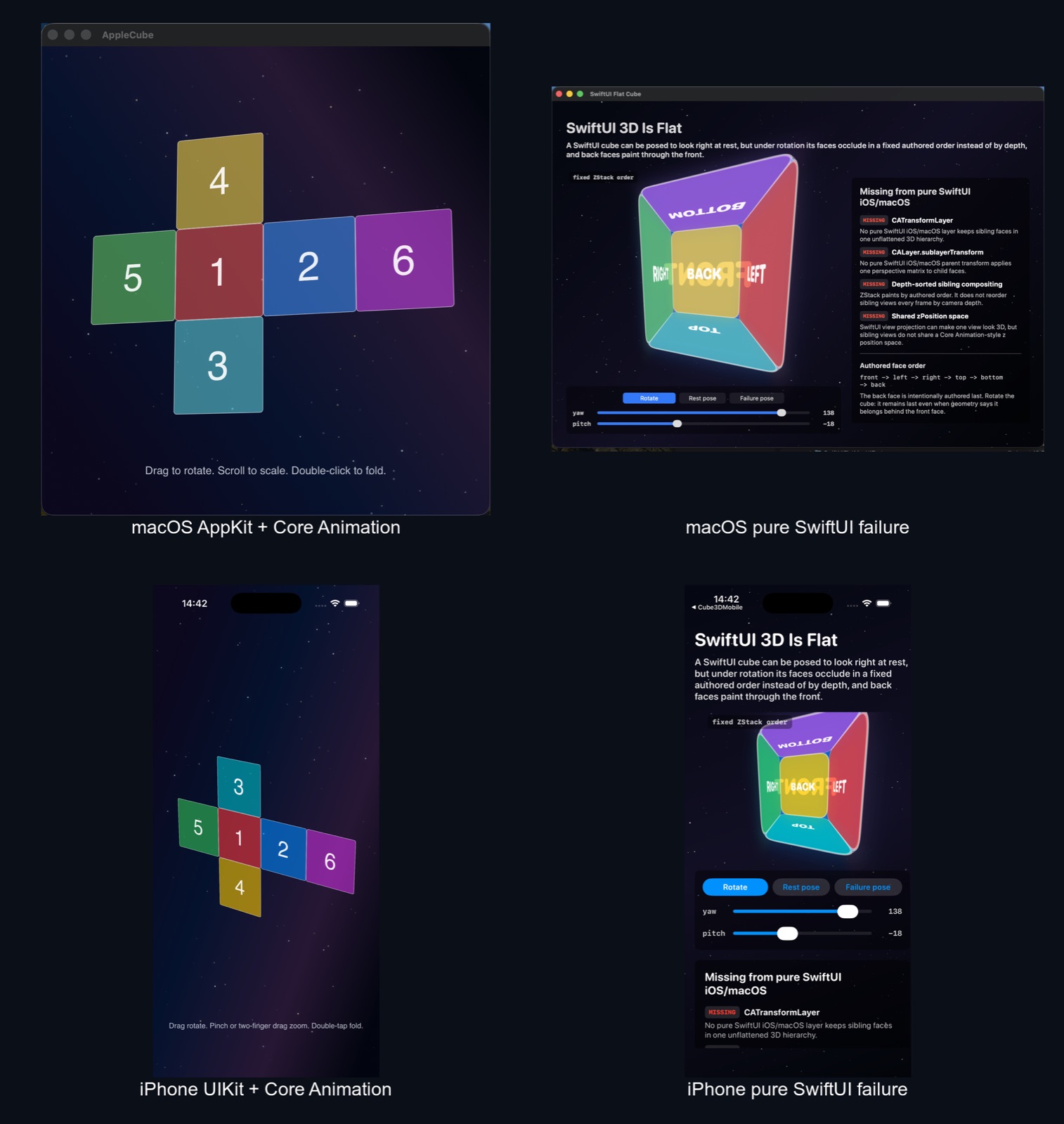
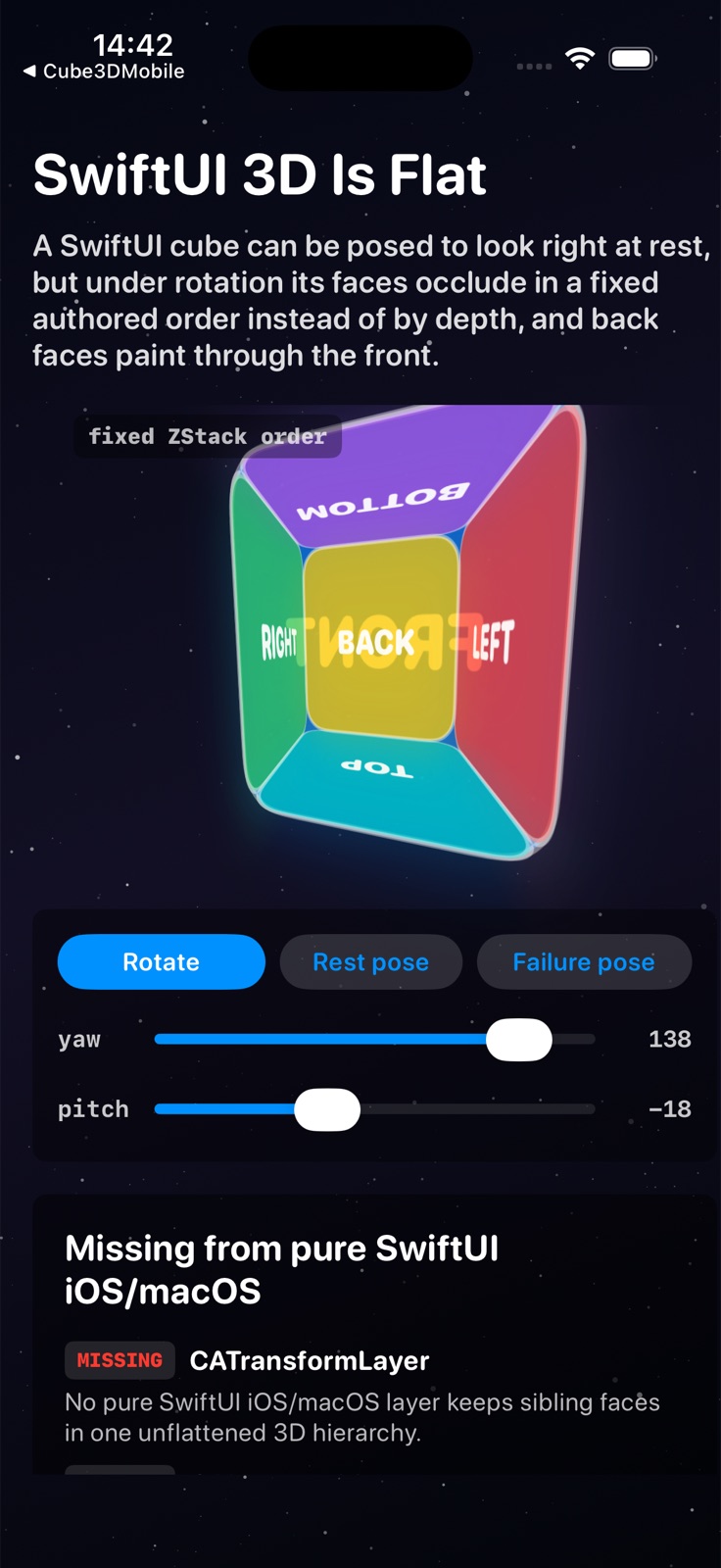
The negative controls are deliberately pure: no UIViewRepresentable, no NSViewRepresentable, no hosted UIKit or AppKit, no Core Animation, no SceneKit, no RealityKit. Even the night-sky background respects the firewall: the layer demos drift their stars with CAEmitterLayer, while the SwiftUI demos draw theirs with Canvas and TimelineView, because borrowing CAEmitterLayer would quietly turn the negative control back into a Core Animation demo.
The positive construction is everything the filter rejected, used directly, and each step is precisely the thing SwiftUI cannot express:
One parent
CATransformLayerholds the six faces as siblings in a single 3D coordinate space. Because it is a transform layer, the faces are not flattened to Z = 0.Perspective lives on the parent, once, shared by every face. One camera for the whole object, which also means one shared vanishing point:
perspective.m34 = -1.0 / 500.0
transformedLayer.sublayerTransform = perspective
Each face is placed in true 3D by its own layer transform. The fold is a rotation per face, and the front face is a real
CATransform3DMakeTranslation(0, 0, zWidth), a genuine +Z translation in the shared space. That z placement is exactly whatanchorZcannot fake, which is why the SwiftUI version is a frustum.Rotating the whole object mutates the parent’s
sublayerTransform. One rotation moves the entire shared space, all six faces together, and the renderer re-resolves occlusion from the shared geometry every frame. Back faces can even be culled withisDoubleSided = false, a compositor rule, not a content swap.
I walked through this construction step by step in Core Animation Layers forming a 3D cube; it comes straight from Apple’s 2011 session Core Animation Essentials, and it still works, character for character, fifteen years later.
Here are both positive witnesses recorded together, the AppKit and UIKit apps hosting the same layer scene at the same time, folding and rotating with correct occlusion at every angle:
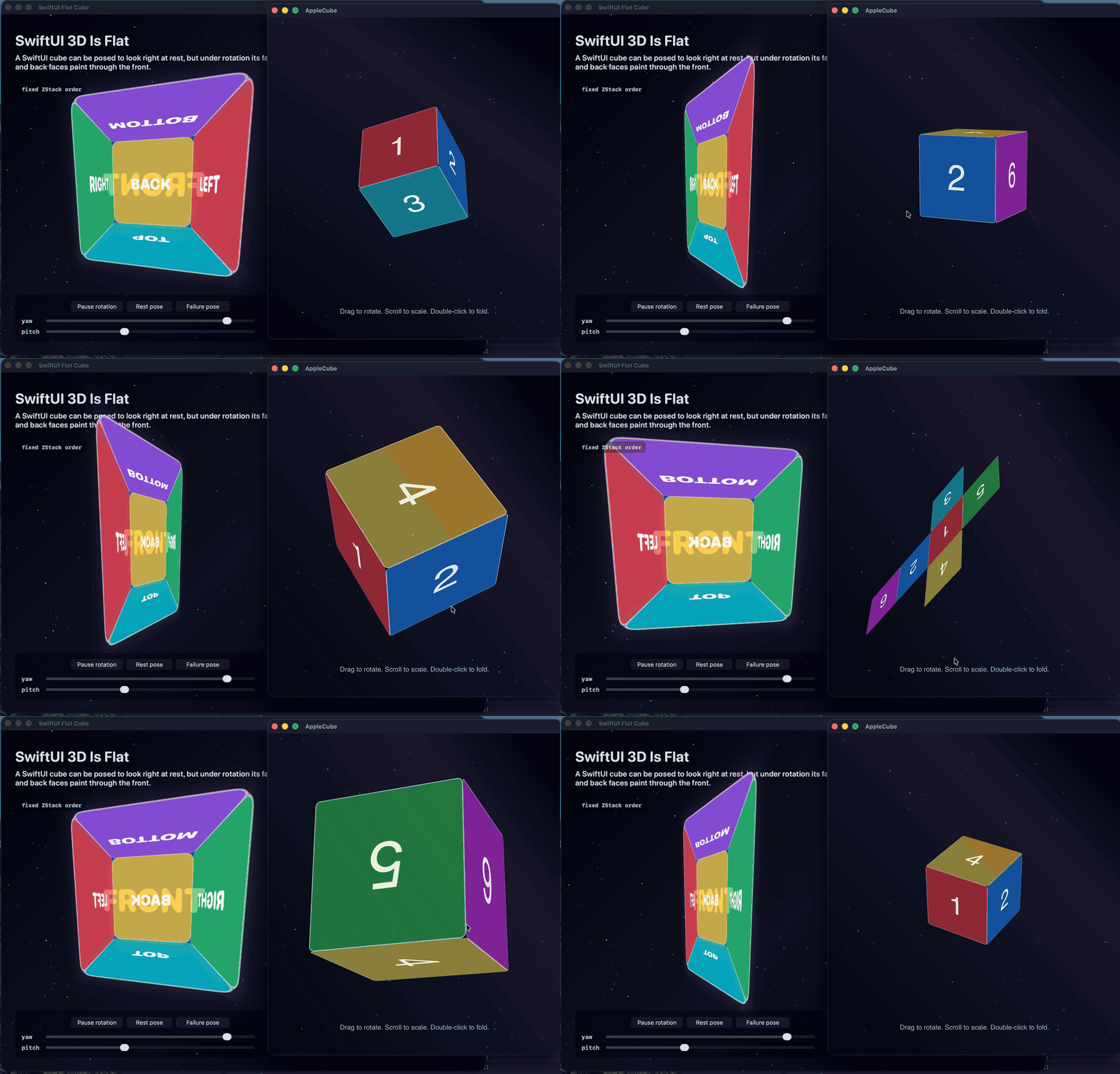
And the macOS witness on its own:
This is not a novel reading of Core Animation. Nick Lockwood’s iOS Core Animation: Advanced Techniques describes the identical model and builds the identical six-face cube: any 3D surfaces in one scene must be siblings “because each parent flattens its children”, CATransformLayer “does not flatten its sublayers, so it can be used to construct a hierarchical 3D structure”, and the parent’s perspective transform means “the vanishing point is set as the center of the container layer, not set individually”. Apple’s documentation, the running code, and a standard text all name the same two ingredients: the single-camera sublayerTransform and the non-flattening container.
Core Animation is 2.5D, and that makes the finding sharper
The article should not overclaim in the other direction either. Core Animation is not a depth-buffered 3D engine. Its model is 2.5D: flat layer surfaces living in a 3D compositing space, with a compositor descended from the painter’s model. Four exact rules:
An ordinary
CALayerflattens its subtree into one flat surface; a 3D transform then warps that surface as a projected quad.sublayerTransformis the parent camera. It applies to sublayers only, never to the parent’s own content. This is where sharedm34perspective belongs.CATransformLayeris the exception: a non-rendering container whose only job is to keep children unflattened, so their faces project independently in one shared space.Depth is sorted, not buffered. Faces are ordered back-to-front in the shared space; there is no per-pixel z-buffer. Mutually intersecting quads are the hard case. A cube of non-intersecting faces is the clean case.
So the missing thing in SwiftUI is not “a 3D GPU”. The missing public primitive is the retained layer-compositor machinery: CATransformLayer, parent sublayerTransform, zPosition as layer-space ordering, and doubleSided as a compositor back-face rule.
There is one more witness worth naming. I have been building a clean-room reconstruction of Core Animation’s layer model, and it arrived at the same boundary from the other direction: to reproduce Core Animation’s cube it had to implement precisely these primitives, the non-flattening transform layer, the parent camera, the two-pivot face projection, the back-to-front depth sort, and back-face culling by projected winding. Its tests hold those behaviors against a live Core Animation rendering oracle, with one honestly open residual, an off-center multi-child seam measurement. A reconstruction that independently converges on the same four primitives is evidence that the boundary is real, not an artifact of one demo.
Card flips prove a different theorem
The classic GeometryEffect card flip, which I walked through in SwiftUILab’s Advanced Animations, is intentionally not one of the witnesses. The trick enters through an allowed opening in the filter: a GeometryEffect receives a CGSize and returns a ProjectionTransform, a pure transform of one rendered rectangle, which is exactly the abstraction SwiftUI permits. Deferring the front-to-back content swap until the card is edge-on makes one rectangle look two-sided, and the card is beautiful because a single rendered rectangle is precisely what SwiftUI is for.
But note what the swap is standing in for. In Core Animation, doubleSided defaults to true and setting it false culls a layer when it faces away from the camera, a compositor rule. The card trick has to swap content manually because no such rule exists at the SwiftUI view level. It adds no shared Z space, no depth sorting, no parent camera. A card asks whether one view can be projected. A cube asks whether six siblings can share a scene. Different theorem.
Proof status
Following the discipline from The SwiftUI Oracle, the claim is split into labeled evidence, because “it looks right” is not a result:
| Claim | Status | Evidence |
|---|---|---|
| SwiftUI exposes per-view projection, not a retained 3D hierarchy. | documented | rotation3DEffect(anchor:anchorZ:perspective:) and projectionEffect act on rendered output. No sublayerTransform, no CATransformLayer, no depth-sorted container on iOS/macOS. |
| The richer 3D view model exists, elsewhere. | documented | transform3DEffect, perspectiveRotationEffect, and the Rotation3D form of rotation3DEffect are visionOS-only. |
| The pure SwiftUI cube fails under rotation. | witnessed | The rendered yaw sweep: a frustum at rest, the front face painting on top after turning away at 120 and 180 degrees. The repo’s SwiftUIFlatMobile and SwiftUIFlatMac keep the failure visible and scripted. |
| The rejected primitives exist one level down. | documented | CATransformLayer is documented as the non-flattening true-3D container; sublayerTransform, zPosition, anchorPointZ, and doubleSided are public layer API. |
| The real cube runs on iPhone and macOS. | witnessed | Cube3DMobile and Cube3DCAMac host the same layer-only scene from UIKit and AppKit. |
| A clean-room reconstruction needs the same primitives. | witnessed | The Core Animation reconstruction independently implements the transform layer, parent camera, depth sort, and culling, gated against a live rendering oracle, with one disclosed open seam measurement. |
| Pixel-for-pixel equivalence to Apple’s compositor, inside AppleCube. | blocked | No pixel oracle in that repo yet. Its evidence is documented API surface plus executable witnesses. |
And the honest labeling that keeps all of this defensible:
The AppleCube demo is labeled what it is: a UIKit/AppKit host with a Core Animation layer scene. It is not “pure SwiftUI 3D” and does not claim to be.
The counterexample above is genuinely pure SwiftUI, and it is labeled as what it is: a SwiftUI cube that demonstrates the flattening limit, not a working cube.
If you need a real cube inside a SwiftUI app on iOS or macOS today, the honest construction is a SwiftUI host wrapping the
CATransformLayerscene through a representable, or SceneKit, or RealityKit. None of those is “pure SwiftUI 3D”.
Run it yourself
Everything is in the AppleCube repository, including the recording scenarios that drive the failure poses reproducibly:
xcodebuild \
  -project Cube3DCA/Cube3DCA.xcodeproj \
  -scheme SwiftUIFlatMobile \
  -configuration Debug \
  -destination 'platform=iOS Simulator,name=iPhone 17' \
  build
Swap the scheme for Cube3DMobile, Cube3DCAMac, or SwiftUIFlatMac for the other three witnesses.
In The Morlocks Built SwiftUI I argued that the foundation never left. This article is the constructive version of that argument, read off the API surface itself and then rendered to check. SwiftUI’s architects looked at the layer model, kept everything that could be expressed as a value transform of one rectangle, collapsed depth into draw order, and declined to expose the scene, then built the fuller 3D model where the platform demanded it, on visionOS. That decision is why your app animates smoothly without you ever thinking about the render loop. It is also why, when you finally need the cube on iOS or macOS, you will find it one hosting view below the boundary they drew.