

Cupertino: Offline Apple Documentation for AI Agents
TL;DR: I built an MCP server that gives Claude Desktop offline access to 22,000+ Apple documentation pages across 261 frameworks. No more hallucinated APIs.
The Problem
If you’ve used Claude or ChatGPT for Swift/iOS development, you’ve seen this:
“Use the
NavigationViewwith.navigationBarTitle()modifier…”
Except NavigationView is deprecated. It’s NavigationStack now. And the modifier is .navigationTitle().
AI models hallucinate APIs. They mix up iOS 14 patterns with iOS 17. They invent methods that don’t exist. And when you’re deep in a coding session, these small errors cost you hours.
The Solution: Cupertino
Cupertino is an MCP (Model Context Protocol) server that:
- Crawls Apple Developer documentation, Swift Evolution proposals, and Swift.org
- Indexes everything into a local SQLite FTS5 database with BM25 ranking
- Serves documentation to Claude Desktop via MCP
When Claude needs to answer a SwiftUI question, it searches your local documentation instead of relying on training data.
What You Get
22,044 documents across 223 frameworks:
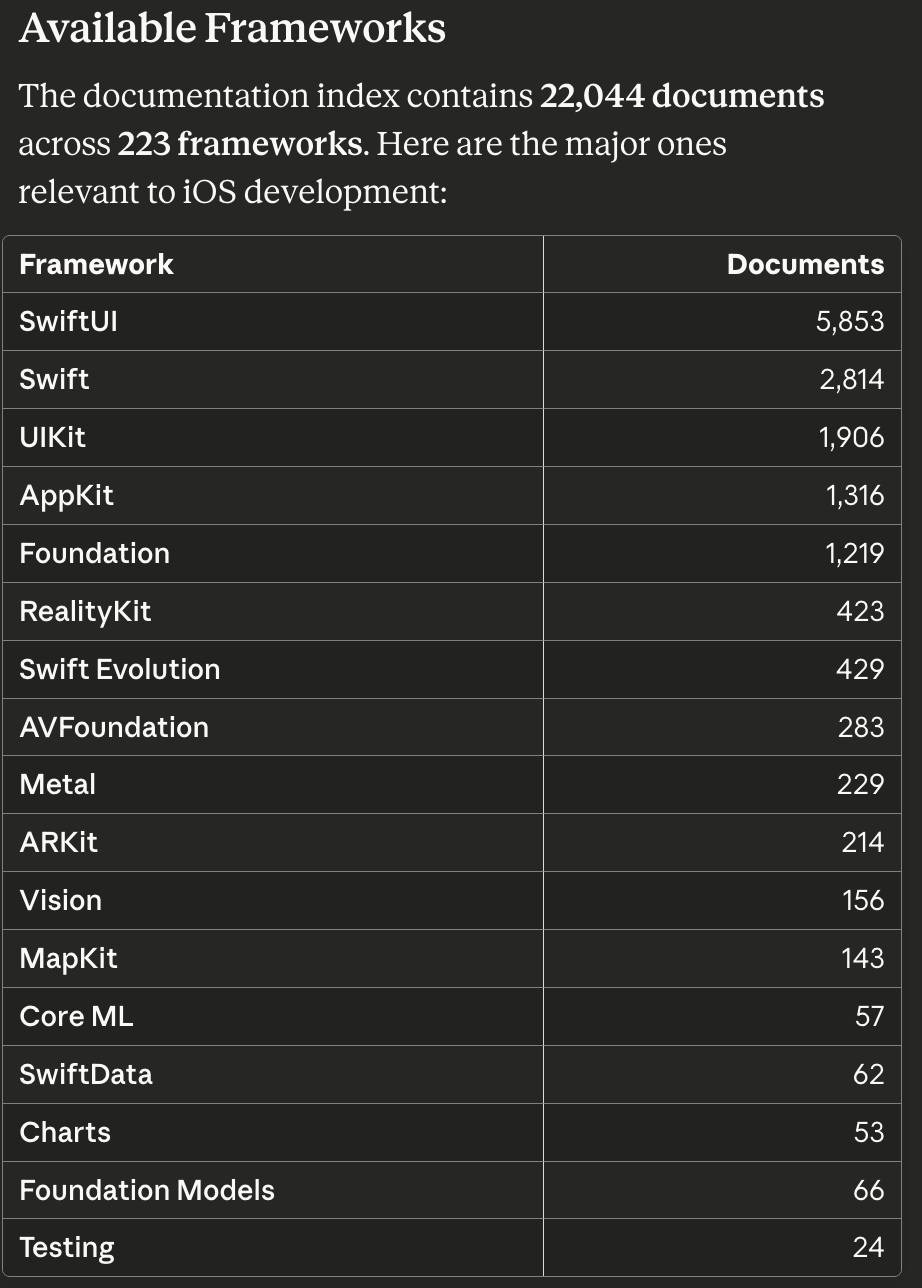
The documentation index contains 22,044 documents across 223 frameworks, including all major Apple platforms.
| Framework | Documents |
| SwiftUI | 5,853 |
| Swift | 2,814 |
| UIKit | 1,906 |
| AppKit | 1,316 |
| Foundation | 1,219 |
| Swift.org | 501 |
| Swift Evolution | 429 |
| RealityKit | 423 |
| … | … |
Two MCP tools:
search_docs- Full-text search with BM25 rankinglist_frameworks- Discover available documentation
Example search result:
# Search Results for "SwiftUI View"

## 1. View | Apple Developer Documentation
- **Framework:** swiftui
- **URI:** apple-docs://swiftui/documentation_swiftui_view
- **Score:** 1.82
- **Words:** 2,682

Protocol# View
A type that represents part of your app's user interface...

Claude Desktop using Cupertino’s MCP tools to search documentation and list available frameworks
Installation
1. Build from source
git clone https://github.com/mihaelamj/cupertino.git
cd cupertino
make build
sudo make install
2. Fetch documentation
# Quick start: Swift Evolution only (~5 minutes)
cupertino fetch --type evolution
cupertino save

# Full documentation (~20-24 hours, one-time)
cupertino fetch --type docs --max-pages 15000
cupertino fetch --type evolution
cupertino save
Expected output after indexing:
✅ Search index built successfully!
   Total documents: 22044
   Frameworks: 261
   Database: /Users/mm/.cupertino/search.db
   Size: 163.6 MB

💡 Tip: Start the MCP server with 'cupertino serve' to enable search
Why 20+ hours? The crawler respects Apple’s servers with a 0.5s delay between requests. 21,000 pages × 0.5s = many hours. But it’s a one-time operation.
3. Configure Claude Desktop
Edit ~/Library/Application Support/Claude/claude_desktop_config.json:
{
  "mcpServers": {
    "cupertino": {
      "command": "/usr/local/bin/cupertino"
    }
  }
}
Restart Claude Desktop. Done.
4. Verify it works
cupertino doctor
✅ MCP Server
   ✓ Server can initialize
   ✓ Transport: stdio
   ✓ Protocol version: 2024-11-05

📚 Documentation Directories
   ✓ Apple docs: ~/.cupertino/docs (21,114 files)
   ✓ Swift Evolution: ~/.cupertino/swift-evolution (429 proposals)

🔍 Search Index
   ✓ Database: ~/.cupertino/search.db
   ✓ Size: 156.0 MB
   ✓ Frameworks: 261

✅ All checks passed - MCP server ready
How It Works
1. Fetch:  cupertino fetch --type docs
   → WKWebView renders JavaScript-heavy pages
   → HTML converted to Markdown
   → Saved to ~/.cupertino/docs/

2. Save:   cupertino save
   → Markdown files indexed into SQLite FTS5
   → BM25 ranking for relevance scoring
   → ~160MB database for full index

3. Serve:  cupertino serve
   → MCP server starts on stdio
   → Claude Desktop connects via JSON-RPC
   → Search queries hit local database
Architecture
Built with Swift 6.2 and strict concurrency:
Packages/
├── MCP/                 # Model Context Protocol implementation
├── Search/              # SQLite FTS5 search engine
├── Core/                # Crawlers (WKWebView, GitHub API)
├── CLI/                 # Command-line interface
└── Resources/           # Bundled catalogs (9,699 packages, 606 samples)
Key decisions:
- Swift 6.2 with 100% strict concurrency checking
- Actor isolation for thread-safe state management
- SQLite FTS5 with BM25 for fast, relevant search
- WKWebView to render Apple’s JavaScript-heavy documentation
Room for Improvement
Honest feedback from testing: the search works, but it’s not perfect.
Current limitation: BM25 treats all documents equally. A search for “SwiftUI” returns mouseEntered(with:) alongside View protocol because both contain “SwiftUI” with similar frequency.
Planned improvements:
- Boost by word count - Comprehensive docs (2000+ words) rank higher than stub pages (61 words)
- Boost by path depth -
/swiftui/viewranks higher than/swiftui/nshostingview/mouseentered - Document type weighting - Overview pages rank higher than individual method docs
- Curated importance flags - Mark foundational docs for priority ranking
The search is still useful for targeted queries like “SwiftUI NavigationStack” or “SE-0001”. Broad queries need work.
Why I Built This
I was tired of:
- Claude inventing deprecated APIs
- Switching to Safari to verify every code suggestion
- Losing flow state to documentation lookups
Now Claude searches my local 160MB documentation database. Same query, same results, every time. Offline. Fast.
Links
- GitHub: github.com/mihaelamj/cupertino
- Requirements: macOS 15+, Swift 6.2+, Xcode 16+
- License: MIT
Built with Swift, frustration, and too many hours debugging WKWebView concurrency issues.